

There's a difference between technology that makes you more productive and technology that makes it possible for you to manage the demands of your working day.
Imagine explaining to somebody that you need help managing your workload.
They suggest a diary.
You've got a diary.
They suggest writing things down.
You've got several notebooks.
They suggest creating a to-do list.
You've got plenty of those too.
The difficulty isn't necessarily that you have nowhere to record what needs doing.
It's that you need support working out what needs doing, understanding how the responsibilities fit together, establishing priorities and remembering where you left off.
For some people with ADHD, conventional organisational tools only address part of the problem.
Assistive technology offers another possible approach.
From software that makes written information more accessible to AI assistants that help process complex workloads, technology may provide practical support with activities that otherwise require considerable mental effort.
And depending on your circumstances, you may be eligible for government-funded employment support through Access to Work.
Understanding what technology can do, what support you actually need and how to explain those needs is an important starting point.
At a glance
- Assistive technology can help people manage barriers associated with disabilities and health conditions.
- ADHD-related workplace barriers may involve organisation, working memory, task initiation, attention and managing competing responsibilities.
- Assistive technology encompasses much more than specialist physical equipment.
- Mainstream software can sometimes provide useful accessibility support.
- AI may offer practical executive functioning assistance, although evidence for ADHD-specific outcomes remains limited.
- Access to Work explicitly includes ADHD within its eligibility guidance.
- You do not need a formal diagnosis to apply under current published Access to Work guidance.
- Eligibility does not guarantee funding for a particular product.
- Employers remain responsible for making reasonable adjustments where legally required.
- Access to Work operates in Great Britain, with separate arrangements in Northern Ireland.
- Support should be based on individual functional needs rather than a diagnosis alone.
What is assistive technology?
Assistive technology is a broad term describing products, equipment, software and related systems that support people's functioning and independence.
It can include physical equipment.
Communication devices.
Specialist computer software.
Accessibility features.
Digital organisational tools.
Electronic reminders.
Systems that help people access, understand or communicate information.
The purpose of assistive technology is not necessarily to change an underlying disability or health condition.
It may instead change how an activity can be completed.
For example, text-to-speech software might allow somebody to listen to information that they find difficult to process through reading alone.
Speech recognition software may provide an alternative to typing.
A visual planning system may help make time and upcoming responsibilities easier to understand.
An AI assistant may help organise complicated information before a person transfers it into an appropriate working system.
Different people may benefit from different forms of support.
The most expensive or technically sophisticated solution is not automatically the most appropriate.
Why ADHD assistive technology isn't always obvious
Some forms of disability-related support are relatively easy to recognise.
A specialist keyboard has a visible physical presence.
A screen reader performs an identifiable accessibility function.
A hearing assistance device addresses a particular communication need.
Executive functioning support can be harder to explain because many of the activities involved are invisible.
Two people might produce similar pieces of work.
One completes the activity with relatively little difficulty.
The other spends considerable time reconstructing instructions, managing distractions, organising information and establishing where to begin.
Looking at the finished work alone may reveal very little about those differences.
This is particularly relevant for people who have developed extensive compensatory strategies throughout their working lives.
Professional competence and support needs can exist alongside one another.
A person can be highly capable in their profession and still require meaningful disability-related support.
Understanding functional barriers at work
A functional barrier is a difficulty that affects how somebody performs or accesses a particular activity.
Rather than focusing exclusively on an ADHD diagnosis, it can be useful to consider what happens during an ordinary working day.
For example:
You receive a detailed set of instructions but find it difficult to identify the individual stages.
You attend several meetings and struggle to retain the information you need afterwards.
You manage multiple projects and repeatedly need to reconstruct their current status.
You know what your responsibilities are but find it difficult to determine which needs attention first.
You spend considerable time trying to begin an administrative activity.
You regularly lose track of future commitments when other demands interrupt you.
These experiences may suggest different forms of support.
They should not automatically be attributed to ADHD without considering the individual's circumstances and other possible factors.
However, describing the practical barriers can help establish what adjustments or assistive technologies might be useful.
Eight workplace barriers technology may help address
The following My ADHD Path framework illustrates eight areas that may be relevant to ADHD-related workplace support.
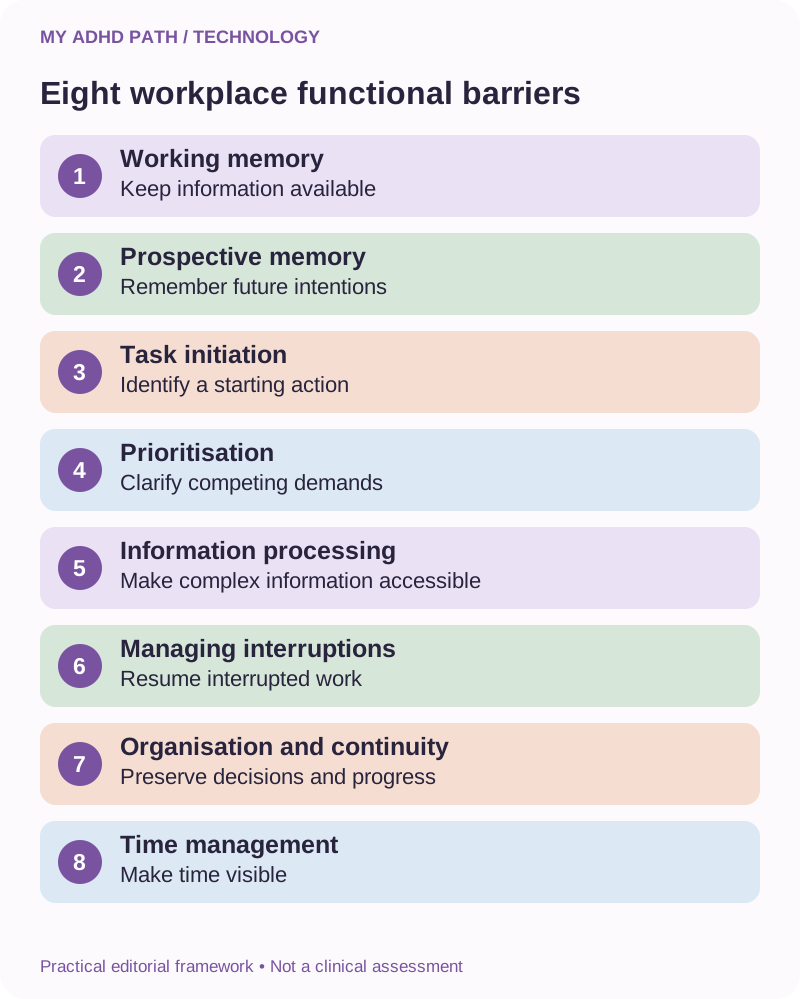
1. Working memory
Difficulty maintaining and using several pieces of information during an activity.
Potential support might include visible instructions, accessible notes, information summaries and structured workflows.
2. Prospective memory
Difficulty remembering intended future actions at appropriate times.
Potential support might include scheduled reminders, follow-up systems and calendar notifications.
3. Task initiation
Difficulty translating an intention into a practical starting action.
Potential support might include guided instructions, task decomposition and interactive planning assistance.
4. Prioritisation
Difficulty establishing which responsibilities require attention when several demands compete.
Potential support might include visual planning tools, structured comparisons and executive functioning assistance.
5. Information processing
Difficulty managing lengthy, complex or poorly structured information.
Potential support might include reading tools, text-to-speech, visual representations and structured summaries.
6. Managing interruptions
Difficulty preserving attention or reconstructing work after an interruption.
Potential support might include distraction management, project handover notes and structured working environments.
7. Organisation and continuity
Difficulty keeping relevant information, decisions and responsibilities accessible across different activities.
Potential support might include centralised records, project workspaces and external memory systems.
8. Time management
Difficulty estimating how long activities may take or maintaining awareness of passing time.
Potential support might include visual timers, calendar planning tools and time estimation exercises.
These categories overlap.
They are a practical editorial framework rather than a diagnostic assessment.
Ten categories of assistive technology for ADHD
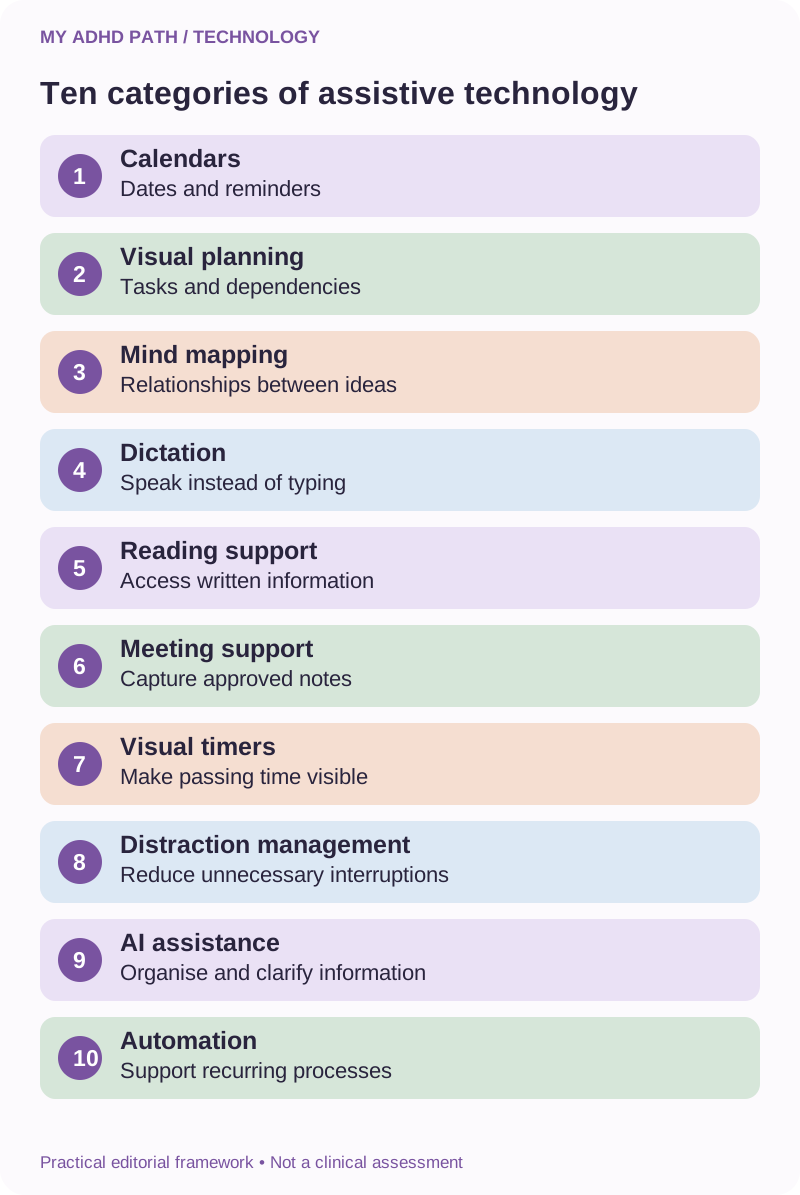
1. Digital calendars and reminder systems
These can help make appointments, deadlines and recurring responsibilities visible.
Potential features include advance notifications, recurring reminders, shared calendars and appointment preparation prompts.
Examples may include calendar features already available on your phone, computer or authorised workplace system.
2. Visual planning and project management software
Some people find it easier to understand responsibilities when they are represented visually.
Project boards, timelines and structured task views may help make dependencies, progress and priorities more explicit.
Examples include Trello, Asana, Microsoft Planner and other comparable platforms.
A project management application is not automatically a disability-specific solution.
Its usefulness depends on how it addresses an individual's needs.
3. Mind mapping software
Mind mapping tools can provide a visual way to explore relationships between ideas.
They may support planning, brainstorming, organising information and preparing written work.
Examples include MindManager, MindView, XMind and other mind mapping applications.
Some products may include additional accessibility features.
4. Speech recognition and dictation
Speech recognition allows spoken language to be converted into written text.
It may be useful when somebody finds it easier to explain their thoughts verbally before organising them into a written format.
Many operating systems include built-in dictation.
Specialist products may provide additional functionality.
Consider accuracy, confidentiality and the suitability of the working environment.
5. Text-to-speech and reading support
These tools can read written material aloud or provide alternative ways to interact with text.
They may be useful for some people who experience difficulties maintaining attention while reading or processing lengthy documents.
Examples include built-in operating system accessibility features and specialist reading software.
Individual preferences and accessibility needs vary.
6. Meeting note and transcription tools
Meeting support software may help capture information for later review.
Some tools can produce transcripts, summaries and suggested action points.
This may reduce the need to simultaneously listen, contribute, remember information and take detailed notes.
Transcripts and summaries may contain errors.
Recordings must be handled in accordance with relevant workplace policies, confidentiality requirements and data protection obligations.
Permission to attend a meeting does not automatically establish permission to record it or share its contents with an external service.
7. Time awareness and visual timer tools
Visual timers can provide a more explicit representation of passing time.
They may help with transitions, time-limited activities and recognising when a working period is approaching its end.
Examples include physical visual timers and suitable digital alternatives.
Time tracking should support an individual's working needs rather than become a source of excessive monitoring.
8. Distraction management tools
Some applications and device settings can reduce unnecessary notifications or temporarily restrict access to distracting websites.
Noise-reducing equipment may also be helpful for some individuals, depending on their environment and sensory preferences.
These approaches should be compatible with job responsibilities and workplace safety requirements.
9. AI-supported executive functioning tools
Conversational AI may help organise unstructured information, identify relevant priorities, break responsibilities into manageable stages and preserve continuity across projects.
Examples of general-purpose assistants include ChatGPT, Claude, Gemini and Microsoft Copilot.
Specialist neurodiversity-focused products also exist.
Services differ in their features, privacy arrangements, accessibility and reliability.
These examples are not endorsements or a list of products approved by Access to Work.
10. Workflow and automation systems
Automation can help reduce recurring administrative demands through predefined schedules, reminders and actions.
More sophisticated systems can connect authorised workplace applications.
Some people may benefit from automated follow-up reminders, structured recurring procedures or scheduled information summaries.
Automation requires appropriate configuration, testing and oversight.
Our Everyday Automation guide explores these possibilities in greater depth.
The difference between mainstream and specialist technology
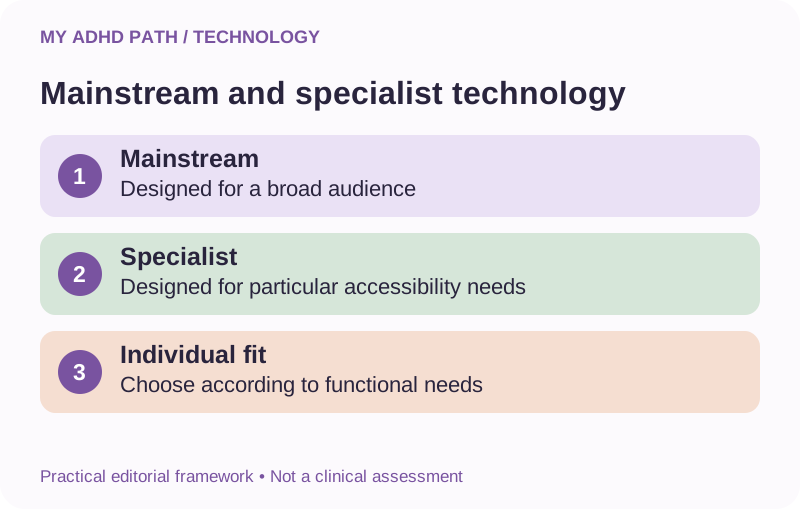
Mainstream technology is designed for a broad range of users.
Specialist assistive technology may be developed specifically to address particular accessibility or functional needs.
However, the distinction is not always straightforward.
A mainstream speech recognition tool might provide valuable disability-related support.
A specialist organisational application might not meet a particular individual's requirements.
The relevant question is not simply whether a product is marketed as assistive technology.
It is whether the product addresses the functional barrier effectively, safely and appropriately.
For funding purposes, additional questions arise.
Is the proposed support necessary for the individual's work?
Does it address a disability-related need?
Is it something an employer should reasonably provide?
Is it an ordinary business expense?
Are there suitable alternatives?
Is the proposed approach proportionate to the person's circumstances?
These questions are especially relevant when discussing general-purpose AI subscriptions.
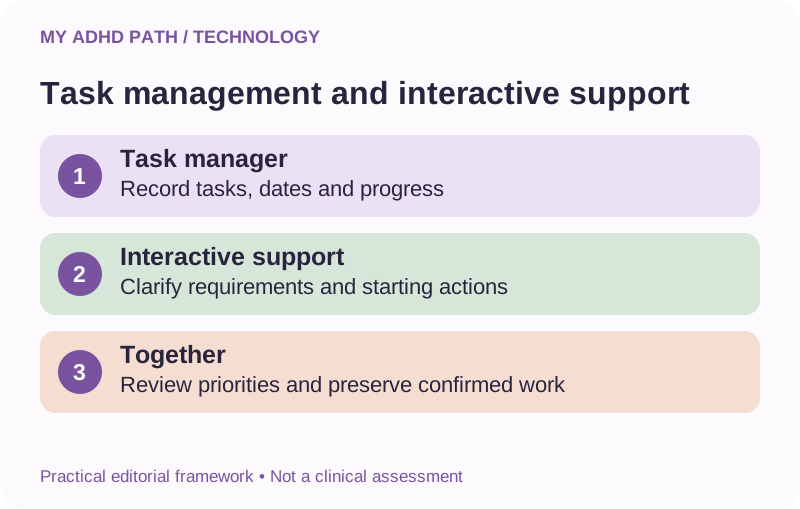
What a traditional task manager may not provide
Imagine you have the following tasks recorded in an application.
Finish a report.
Respond to three clients.
Prepare for a meeting.
Review a contract.
Update a website.
Chase an outstanding decision.
The application can store the responsibilities.
Remind you that they exist.
Display deadlines.
Allow you to mark them as completed.
These are useful functions.
But you may still need to determine:
Which activity matters most.
What finishing the report actually involves.
Whether another person's response is required before you can proceed.
What can reasonably be completed today.
Where important information is located.
Which activity you should begin with.
A conventional task manager may provide limited support with those decisions, depending on its capabilities and configuration.
A conversational AI assistant may help process the information before it is recorded or acted upon.
This is one of the potential differences between organisational software and interactive executive functioning support.
AI as assistive technology for ADHD
AI is often promoted as a way to increase productivity.
Write faster.
Research faster.
Generate more content.
Complete more work.
But those are not necessarily the most relevant applications for somebody experiencing ADHD-related barriers.
The potential value may instead involve:
Reducing the effort required to organise information.
Making complicated instructions more manageable.
Helping establish an appropriate starting action.
Making project decisions easier to retrieve.
Supporting continuity across interruptions.
Clarifying competing responsibilities.
Reducing repeated planning and reconstruction.
This form of assistance may be practically significant even if it does not produce dramatic measurable time savings.
For example, a person might be able to complete an important activity independently with suitable support when they would otherwise have substantial difficulty beginning it.
That is a different consideration from simply completing the same activity more quickly.
However, general-purpose AI is not a clinically validated treatment for ADHD.
Its usefulness as workplace support needs to be considered individually.
AI-generated information may be unreliable, and not every person will find conversational assistance helpful.
Five types of AI executive functioning support
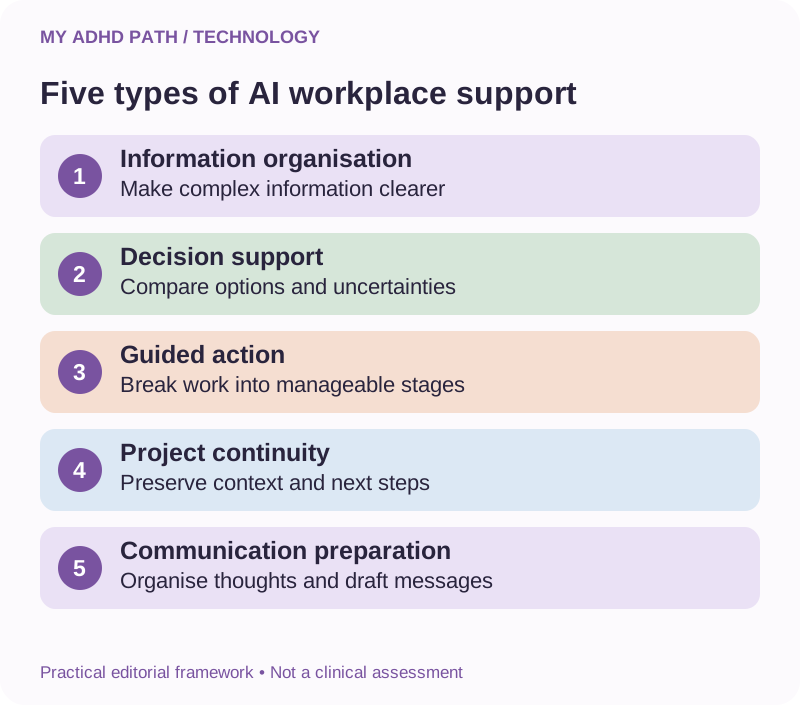
Information organisation
Turning complicated or unstructured information into a clearer overview.
Decision support
Helping compare relevant options, identify missing information and clarify priorities.
Guided action
Breaking a responsibility into manageable stages and supporting progress through them.
Project continuity
Recording decisions, summarising progress and identifying where to resume work.
Communication preparation
Helping organise thoughts and prepare appropriate written communications.
These functions may overlap with existing software, human support and other workplace adjustments.
They are relevant areas to explore, rather than an established list of funded Access to Work interventions.
Worked example: Returning to an interrupted project
Imagine you've been working on a complex project for several days.
You've established the approach, completed several stages and discussed important decisions with colleagues.
Then an unrelated urgent responsibility interrupts you.
When you eventually return to the project, you need to reconstruct the working context.
You might search through emails.
Review documents.
Read old meeting notes.
Check several conversations.
Try to remember why a previous decision was made.
Before you can begin meaningful work again, you may have spent considerable effort rebuilding the information you previously had available.
An appropriate support system could provide a concise project handover.
It might contain:
- The current objective.
- Confirmed decisions.
- Completed stages.
- Outstanding questions.
- Relevant documents.
- The next agreed action.
An AI assistant may help prepare such a summary from approved information.
Store and verify the result in a reliable workplace system.
The purpose is to reduce the need to repeatedly reconstruct the same working context.
It is not to transfer responsibility for project decisions to the assistant.
Worked example: Processing a complicated workload
Imagine a person receives responsibilities from several colleagues.
Some have deadlines.
Some depend on information that has not yet arrived.
Some are simply suggestions.
The person finds it difficult to distinguish these categories while managing the rest of their work.
An AI assistant might help organise the information into:
Confirmed commitments.
Outstanding decisions.
Waiting for information.
Time-sensitive responsibilities.
Possible future activities.
The person can then review the overview with the relevant colleagues or manager where necessary.
The output may help make the workload more manageable.
But the system should not invent deadlines, independently determine organisational priorities or create commitments that were never agreed.
Important workplace decisions remain subject to appropriate human oversight.
What is Access to Work?
Access to Work is a government employment support programme administered by the Department for Work and Pensions.
It operates in England, Scotland and Wales.
The scheme may provide eligible people with practical or financial assistance relating to disability or health-related employment barriers.
Official guidance identifies specialist software and equipment alongside forms of human and practical workplace assistance.
The nature and amount of an award depend on individual circumstances and the scheme's requirements.
Access to Work is not a general technology allowance or a grant for everybody with an ADHD diagnosis.
It is intended to address additional support needs associated with working.
The official starting point is:
https://www.gov.uk/access-to-work
Northern Ireland operates a separate Access to Work scheme.
Does ADHD qualify for Access to Work?
ADHD is explicitly included in the government's published examples of conditions that may make somebody eligible.
Current general eligibility guidance includes age, work status, location and a need for disability or health-related support.
People may be able to apply while working or when due to enter or return to qualifying paid work within the published timeframe.
A formal diagnosis is not a prerequisite to applying.
However, applicants may need to provide information about their circumstances and support needs.
The inclusion of ADHD within the eligibility guidance does not mean every applicant will receive an award.
It also does not establish that a particular type of support will be approved.
Check the current requirements here:
https://www.gov.uk/access-to-work/eligibility
What types of support can Access to Work provide?
Depending on eligibility and individual circumstances, support may involve equipment, software, adaptations, suitable human assistance or other employment-related provision.
Consider the following distinction.
The scheme recognises categories of practical support.
It does not follow that every product within a particular category will be funded.
For example, specialist software is a recognised form of support.
That does not mean every software subscription constitutes an eligible expense.
The relevant decision depends on the individual's functional needs, the proposed solution and applicable scheme rules.
For more detailed information, read the official customer factsheet.
Can Access to Work pay for AI subscriptions?
This is a particularly relevant question as more people with ADHD discover conversational AI.
The general government guidance recognises assistive software as a possible form of practical support.
However, that does not establish an automatic entitlement to funding for ChatGPT, Claude, Copilot or any other particular AI product.
When considering AI-supported workplace assistance, it may be useful to explain:
The specific barrier you experience.
The effect it has on your working activities.
The support you have already tried.
What the proposed AI functionality provides.
Why existing arrangements do not sufficiently address the difficulty.
Whether a suitable alternative could meet the same need.
What the additional costs would be.
How the technology would be used securely.
It is important to distinguish an individually assessed support requirement from a general desire to use AI in your profession.
A subscription can be useful for several purposes, including ordinary commercial activities.
This may complicate the consideration of its disability-related role.
The scheme's decision-makers are responsible for determining whether particular support can be funded.
Our forthcoming dedicated guide to Access to Work and AI software will explore this subject in more detail.
Free AI versus paid AI: How to explain the difference
Many AI services offer both free and paid access.
A paid service may provide different usage limits, document capabilities, access to particular models, project features or other functionality.
These features and prices can change.
A free service may be sufficient for some support needs.
For other people, limitations may affect the practicality or continuity of their working arrangements.
For example, a person may use conversational assistance throughout several stages of a complex working day.
If their access becomes unavailable during an important activity, they may need to reconstruct their work using another system.
Whether paid access is necessary depends on the actual circumstances.
If you are discussing paid technology with an assessor, avoid simply stating that the paid version is better.
Identify the specific functionality or access requirement that matters.
Explain what happens without it.
Identify any suitable lower-cost alternatives you have considered.
Avoid overstating the limitations of free services.
Use current provider information when explaining the differences.
The objective is to establish a factual connection between a functional need and the proposed support.
Access to Work and reasonable adjustments
Employers have responsibilities under the Equality Act 2010 in Great Britain to make reasonable adjustments where the legal duty applies.
These adjustments may involve changes to working arrangements, equipment, procedures or other aspects of the working environment.
Access to Work is not intended to replace an employer's existing legal responsibilities.
For an employee, a useful starting point may involve discussing:
Existing difficulties.
Possible adjustments.
Available workplace technology.
Relevant organisational policies.
Additional needs that remain unresolved.
An occupational health adviser, disability adviser, human resources professional or other appropriate specialist may be able to help.
What constitutes a reasonable adjustment depends on the particular circumstances.
Northern Ireland has separate disability discrimination legislation.
Useful starting points in Great Britain include:
https://www.gov.uk/reasonable-adjustments-for-disabled-workers
https://www.acas.org.uk/reasonable-adjustments
Seek appropriate advice if you are uncertain about your individual legal position.
Ordinary business costs versus disability-related support
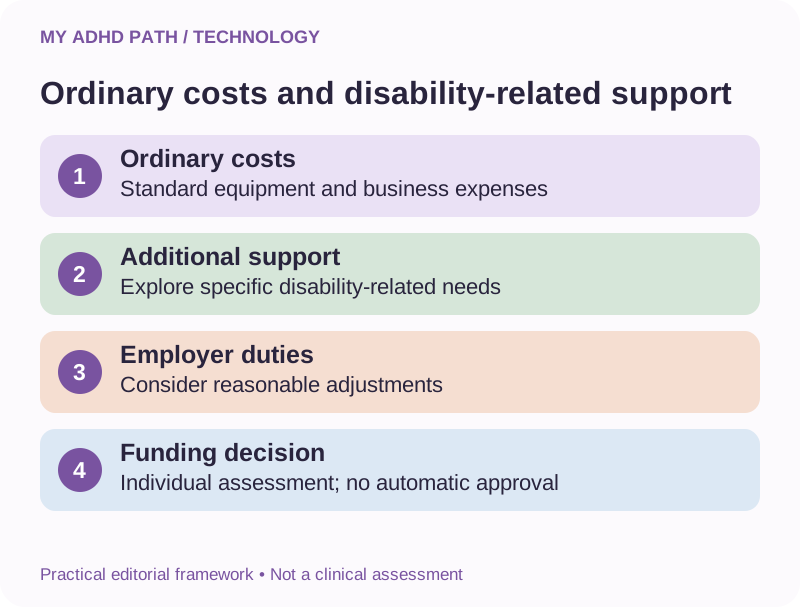
This distinction is particularly important.
The Department for Work and Pensions' published Access to Work staff guidance distinguishes ordinary equipment and business expenses from additional costs associated with a disability-related need.
General costs that would arise in the normal operation of a business are not automatically eligible.
Where a proposed solution includes ordinary provision alongside additional disability-related support, the additional element is the relevant consideration under the guidance.
For example, an ordinary computer required for a particular job would usually be a normal business requirement.
An additional specialist adaptation or accessibility tool may raise a different question.
Similarly, a general business software subscription should not automatically be treated as an eligible expense simply because a person with ADHD finds it useful.
But it may be appropriate to explore whether particular additional functionality addresses an identified disability-related employment barrier.
The assessment and decision must consider the actual circumstances.
Do not attempt to describe an ordinary business expense as specialist support if that is not an accurate reflection of its purpose.
The published staff guidance is available here:
https://www.gov.uk/government/publications/access-to-work-staff-guide/access-to-work-staff-guide
Access to Work for self-employed people with ADHD
Self-employed people may be able to receive Access to Work support if they meet the relevant requirements.
Running a business can involve considerable executive functioning demands.
A person may be responsible for all aspects of their working arrangements, including administrative responsibilities, planning, customer commitments and maintaining continuity across projects.
Appropriate disability-related support may therefore be particularly relevant.
However, being responsible for your own business expenses does not mean those expenses become eligible for funding.
Self-employment is subject to scheme-specific requirements.
Company directors should also establish how their particular employment and company arrangements are treated.
Owning a limited company is not necessarily equivalent to operating as a sole trader.
We will explore these distinctions in our dedicated Access to Work guide for self-employed people and company directors.
Can I get support if I work from home?
Working from home does not automatically exclude somebody from Access to Work.
Published government guidance recognises that a person's workplace may include their home.
This can be relevant for remote workers, hybrid workers and eligible business owners.
However, the proposed support must relate to the person's qualifying work and disability-related requirements.
General household costs and ordinary home office expenses should not automatically be assumed to qualify.
Explain your working arrangements accurately when discussing potential support.
Can assistive technology replace ADHD coaching?
Technology and human support can address different needs.
A digital assistant might help organise information, preserve project context or structure a particular activity.
A suitably qualified or experienced professional may provide individualised guidance, support with developing strategies and opportunities to explore difficulties in greater depth.
Human support may also be important when technological assistance is insufficient or inappropriate.
Some people may find technology useful independently.
Others may benefit from a combination of technology, training, coaching and workplace adjustments.
There is no requirement to choose one approach over another without considering the circumstances.
Access to Work funding for particular forms of human support depends on the individual's needs and applicable scheme rules.
AI should not be represented as a qualified ADHD coach, clinician or therapist.
Why training matters
Receiving a new piece of assistive software does not necessarily mean you immediately know how to use it effectively.
You may need to understand its features.
Establish useful working instructions.
Develop a suitable routine.
Connect it with existing systems.
Learn how to check its output.
Understand its limitations.
For somebody already experiencing organisational demands, introducing new technology can initially create additional work.
Where appropriate, discuss onboarding, training and ongoing support when considering a proposed solution.
Do not assume that these costs will automatically be included in an Access to Work award.
A solution should be considered alongside the practical requirements involved in using it.
The five-stage barrier-to-support method
The following My ADHD Path framework can help you prepare for a discussion about assistive technology.
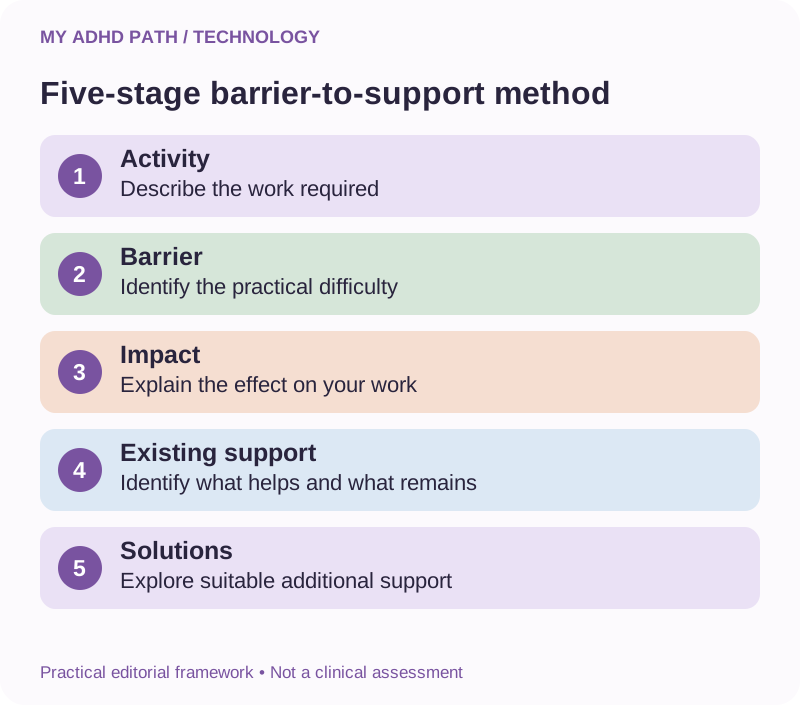
Stage one: Describe the activity
What does your work require you to do?
Identify a specific working activity rather than describing your job in general terms.
Stage two: Identify the barrier
What aspect of the activity is particularly difficult?
Explain what happens in practice.
Stage three: Explain the impact
How does the difficulty affect your working day?
Consider independence, accuracy, continuity, effort and the ability to meet important responsibilities.
Stage four: Describe existing support
What adjustments, technology or strategies have you already used?
Which aspects are useful?
Which difficulties remain?
Stage five: Explore suitable solutions
What additional support might address the outstanding barrier?
Consider alternatives, costs, training and practical limitations.
This framework is not an official DWP assessment process.
It is a practical preparation tool intended to help you organise your own experiences.
Examples of explaining assistive technology needs
The following examples are fictional.
They illustrate the difference between simply requesting a product and describing the practical circumstances behind a possible support need.
Example one: Organisation and prioritisation
General description:
"I need an AI subscription because it makes me more productive."
More informative description:
"My work involves several concurrent projects and responsibilities from different people. I find it difficult to organise the information and establish practical priorities without repeatedly reconstructing the workload. My current task manager records tasks, but it does not provide the interactive support I need to clarify them. I would like to explore whether an appropriate executive functioning tool could address this difficulty."
Example two: Meeting information
General description:
"I want meeting transcription software."
More informative description:
"I find it difficult to simultaneously listen, contribute to discussions and retain detailed instructions. I currently take written notes, but important information is sometimes missed. I would like to explore approved meeting support tools that could make the relevant information available for later review."
Example three: Starting complex activities
General description:
"I need help getting things done."
More informative description:
"When I receive complicated assignments, I can spend considerable time trying to establish the individual stages and where to begin. A structured, interactive tool that helps clarify requirements and identify starting actions may provide support that my existing calendar and task list do not."
Example four: Project continuity
General description:
"I need software to help manage my business projects."
More informative description:
"Interruptions and competing responsibilities can make it difficult for me to resume unfinished work without spending substantial effort reconstructing previous decisions and progress. I would like to explore a reliable system that preserves working context and helps me identify where to resume."
These examples are not model applications or guaranteed funding arguments.
Only describe difficulties and needs that accurately reflect your own experience.
Recording the practical difference support makes
If you already use technology, you may find it helpful to keep a brief record of what it supports.
You do not need to monitor every minute of your working day.
A few representative examples may be useful.
Record the activity.
Describe the difficulty without the relevant support.
Explain what the support helps you do.
Identify any limitations that remain.
Note any relevant costs or alternative approaches.
For example:
Activity: Returning to an interrupted customer project.
Difficulty: Reconstructing previous decisions, working stages and outstanding information.
Existing support: Project management application and written notes.
Additional support being explored: Interactive assistance to prepare a verified project summary.
Potential difference: Less repeated information reconstruction and clearer identification of the next working action.
Limitations: Important decisions, files and deadlines still require verification.
If you choose to record time differences, use actual observations rather than invented figures.
Some forms of support may produce benefits that are difficult to express exclusively in minutes saved.
Explain those differences accurately.
Preparing for an Access to Work assessment
Not every applicant will necessarily follow the same assessment process.
The Access to Work team may need more information about your role, circumstances and requirements.
Where an assessment is arranged, it can be useful to prepare independently beforehand.
Consider gathering:
- A concise description of your role.
- Examples of working activities you find particularly demanding.
- Details of existing workplace adjustments.
- Information about the technology you currently use.
- Examples of difficulties that remain.
- Relevant information about possible solutions.
- Current costs for products being considered.
- Questions about funding, training and ongoing support.
You may find it useful to bring written notes.
You can also ask what communication arrangements or other accessibility support may be available during the process.
Do not assume that preparing particular documents guarantees an award.
Our dedicated Access to Work assessment preparation guide will provide a more detailed resource.
Should I buy assistive technology before receiving an Access to Work decision?
Do not assume that equipment or subscriptions you purchase yourself will be reimbursed.
Funding arrangements depend on approval, the terms of an award and applicable claim procedures.
If you are considering a purchase specifically because you expect Access to Work to pay for it, contact the scheme first.
Ask whether the proposed cost can be considered.
Establish whether approval is required before purchase.
Clarify what evidence, invoices or receipts would be needed.
Find out who would be responsible for payment and claims.
Some people may choose to purchase software independently while waiting for support.
That is a separate financial decision and does not establish an entitlement to reimbursement.
Keep relevant records of existing arrangements if they help explain your workplace support needs.
What if you're still waiting for Access to Work?
Waiting for an employment support decision can be frustrating, particularly when you are already experiencing difficulties at work.
An initial contact or confirmation of your details does not necessarily mean an assessment has taken place or a funding decision has been made.
If your application remains unresolved, it may be helpful to establish a clear written record.
Keep your application reference.
Record the date you applied.
Record relevant communications.
Note any outstanding documents or requested information.
Contact Access to Work to ask about the current status and what happens next.
If a lengthy delay or communication problem remains unresolved, explore the appropriate official escalation and complaints arrangements.
The DWP complaints procedure is available here:
https://www.gov.uk/government/organisations/department-for-work-pensions/about/complaints-procedure
Do not assume that submitting a complaint will automatically expedite or approve an application.
While waiting, consider whether existing tools, workplace adjustments or other appropriate support can help address some immediate difficulties.
Our dedicated waiting-times and delayed-applications guide will explore this subject in more detail.
What should you consider alongside technology?
Assistive technology is only one possible part of workplace support.
Other useful arrangements may include:
Clear written instructions.
Predictable communication methods.
Appropriate flexibility.
Reduced unnecessary interruptions.
Regular priority discussions.
Accessible meeting arrangements.
Agreed project handovers.
Training.
Suitable human support.
A new application may be less helpful if the wider working environment continues to create avoidable difficulties.
For example, organisational software cannot fully address a situation in which priorities are constantly changing without communication.
Consider how the proposed technology fits within the wider workplace.
Choosing assistive technology that actually works for you
Before purchasing or requesting support, consider six questions.
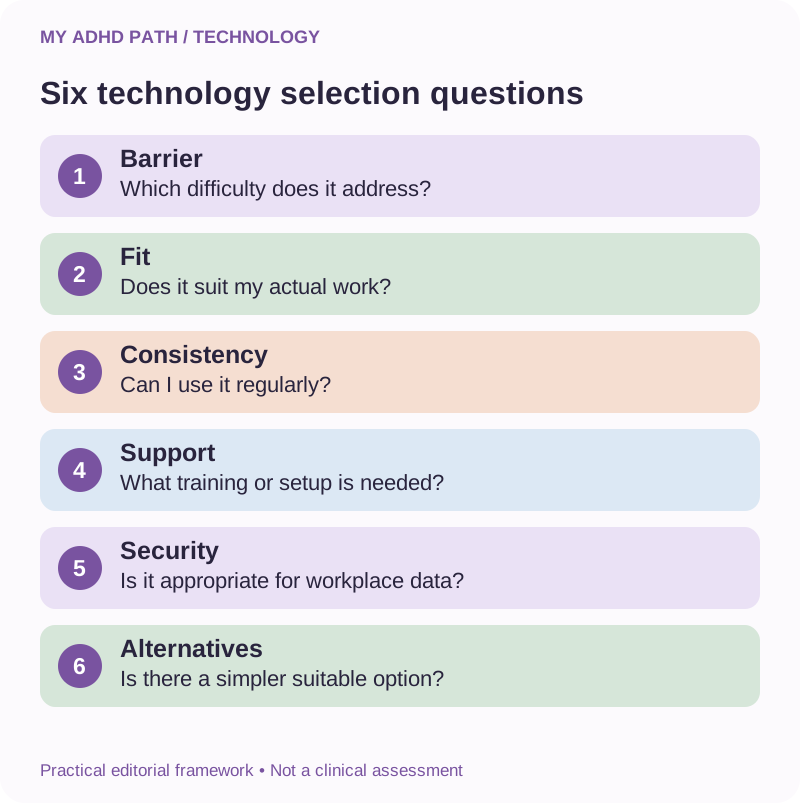
1. Which barrier does it address?
Be specific about the practical difficulty.
2. Does it fit my actual working activities?
Consider real examples rather than hypothetical capabilities.
3. Can I use it consistently?
A useful tool should remain reasonably accessible during demanding working periods.
4. What support will I need to use it?
Consider training, configuration and maintenance.
5. Is it appropriate for my workplace information?
Check privacy, permissions, confidentiality and organisational policies.
6. Is there a simpler suitable alternative?
Compare relevant capabilities and costs.
A successful support system does not need to be technologically impressive.
It needs to meet the person's needs reliably and appropriately.
Protecting your information when using assistive technology
Workplace technology may need access to documents, communications and other information.
Before introducing an AI assistant or connected service, consider:
Whether the organisation permits its use.
What information it receives.
How that information is processed and retained.
Which people or services can access it.
Whether data can be used for model improvement.
Whether appropriate contracts and safeguards are available.
Whether there is a safer method of achieving the same objective.
Do not share passwords, private credentials or confidential information with an unapproved service.
An Access to Work award, if made, should not be interpreted as confirmation that a product automatically meets your employer's security requirements or legal obligations.
Our digital safety guide explores these questions in more depth.
Three fictional workplace experiences
Illustrative scenario
Emma, 41 - Managing a demanding administrative role
Emma's job involves receiving information from several departments. She finds it difficult to distinguish agreed actions from general discussions and regularly needs to reconstruct her priorities. She discusses clearer written instructions and structured priority reviews with her employer. She also explores approved software that could help organise incoming information. Her focus is on identifying the right combination of adjustments and additional support.
Illustrative scenario
David, 48 - Running an independent business
David manages several ongoing customer projects. He finds that interruptions frequently lead to substantial repeated work reconstructing project context. He introduces a reliable project overview and uses an AI assistant to prepare verified handover notes. He explores Access to Work to understand whether additional disability-related support could be appropriate. He does not assume that his existing software subscriptions will be reimbursed.
Illustrative scenario
Aisha, 26 - Processing information during meetings
Aisha finds it difficult to participate in meetings while retaining all the instructions and decisions she needs afterwards. She discusses meeting arrangements with her manager and explores authorised transcription and note support. She also establishes a process for checking and confirming agreed actions. The objective is to make relevant information more accessible without compromising confidentiality.
These examples are fictional illustrations.
They do not describe actual Access to Work awards or demonstrate that particular products would receive funding.
What the research says
Research into ADHD has identified average differences in several aspects of executive functioning. These may have practical implications for activities involving planning, working memory and managing competing demands. Cognitive offloading research examines how people use external resources to change the cognitive requirements of activities. Assistive technology research and accessibility guidance also recognise the importance of matching support to an individual's functional needs and environment. Separately, research into generative AI has identified potential benefits for particular types of workplace activities. However, workplace productivity findings should not be interpreted as proof that general-purpose AI effectively treats ADHD or provides reliable benefits for every person with ADHD. Evidence for particular AI-supported executive functioning interventions remains developing. The practical frameworks in this article are editorial approaches to understanding and describing potential support needs. They are not clinical assessments or validated funding criteria.
Your personal assistive technology audit
Begin by considering one area of your working life.
My working activity: What am I required to do?
My functional barrier: Which aspect of the activity is difficult?
The practical impact: What happens as a result?
My existing strategies: What do I already use?
My outstanding need: What remains difficult?
Potential technology: What forms of support could I explore?
Alternatives: What simpler or lower-cost options might be suitable?
Practical requirements: Would I need training, configuration or additional support?
Information security: What permissions or safeguards would be required?
Next action: Who could help me explore the options?
You can complete the audit independently or discuss it with an appropriate adviser.
It is intended to help organise information, not determine eligibility for a government grant.
Downloadable resource
My ADHD Assistive Technology Toolkit
Find practical support for the way you work. Includes workplace barrier audit, assistive technology comparison, support record and discussion preparation worksheets.
Download PDFA seven-day assistive technology exploration
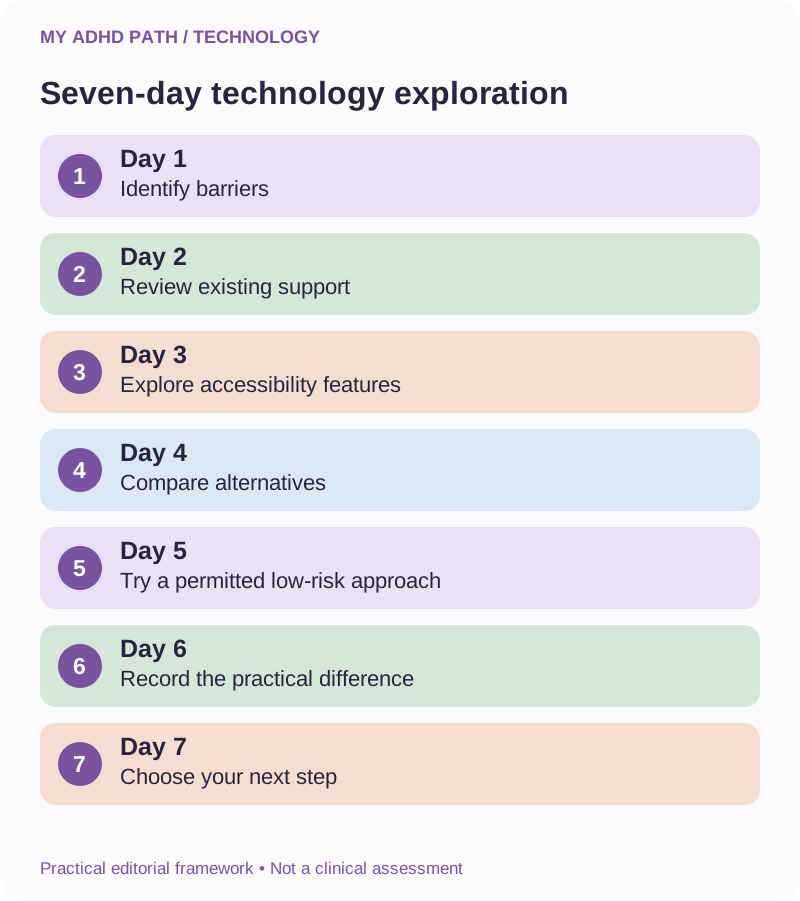
Day one: Identify your barriers
Record one or two representative working activities that regularly require considerable effort.
Day two: Review existing support
Identify the tools and adjustments you already use.
Day three: Explore accessibility features
Find out whether your existing devices or authorised applications offer useful functions you have not yet explored.
Day four: Compare suitable alternatives
Consider one additional type of assistive technology.
Day five: Try a low-risk approach
Where appropriate and permitted, explore a suitable feature or workflow using non-sensitive information.
Day six: Record the difference
Consider what the technology supported and which difficulties remained.
Day seven: Establish your next step
Decide whether to explore further technology, seek advice, discuss workplace adjustments or investigate Access to Work.
This exercise is optional.
You do not need to complete it before applying for Access to Work.
Fifteen AI prompts for exploring assistive technology
AI prompt
1. Help me identify my workplace barriers
"Help me organise these examples of working difficulties into specific activities and functional barriers. Do not infer a diagnosis."
AI prompt
2. Separate the task from the difficulty
"Identify what this activity requires and which aspects I find particularly demanding."
AI prompt
3. Review my existing support
"Organise the tools and strategies I already use and identify the difficulties that remain."
AI prompt
4. Explore technology options
"Suggest categories of assistive technology that might address these practical needs. Include simpler alternatives."
AI prompt
5. Compare traditional and interactive support
"Help me compare what a conventional task manager provides with the interactive assistance I am exploring."
AI prompt
6. Consider existing accessibility features
"Help me identify accessibility features that may already be available in my approved workplace technology."
AI prompt
7. Explain the practical difference
"Help me describe how this particular technology changes the way I carry out my work. Do not invent benefits or outcomes."
AI prompt
8. Prepare for a workplace discussion
"Organise my observations and questions for a conversation about possible workplace adjustments."
AI prompt
9. Prepare for an assessment
"Help me create a concise overview of my role, functional difficulties, existing support and outstanding needs."
AI prompt
10. Compare free and paid software
"Help me establish which specific features or access requirements differ and which are relevant to my actual support needs."
AI prompt
11. Check my assumptions
"Identify unsupported assumptions in my description of this technology and what I need to verify."
AI prompt
12. Review training needs
"Help me identify the practical training and configuration requirements for this proposed tool."
AI prompt
13. Consider information security
"Help me prepare questions about confidentiality, permissions and workplace approval before using this technology."
AI prompt
14. Organise my support evidence
"Create a factual structure for recording representative examples of my working activities and the effect of existing support."
AI prompt
15. Prepare my next steps
"Help me distinguish what I can explore independently, what I should discuss with my employer and what requires confirmation from Access to Work."
These prompts are for preparation and organisation.
They should not be used to fabricate evidence, exaggerate symptoms or generate misleading funding claims.
Frequently asked questions
What is the best assistive technology for ADHD?
There is no universally best product. The appropriate support depends on individual functional needs, working activities and practical circumstances.
Is AI considered assistive technology?
AI may perform functions that provide accessibility or functional support. Whether a particular product is appropriate or fundable depends on the context and relevant requirements.
Can Access to Work help people with ADHD?
Yes. ADHD is explicitly recognised in the published eligibility guidance. Individual eligibility and support requirements must still be considered.
Do I need an ADHD diagnosis to apply?
Current GOV.UK eligibility guidance states that a diagnosis is not required to apply. Information about your condition, circumstances and support needs may still be necessary.
Can Access to Work fund ChatGPT?
There is no automatic entitlement to a ChatGPT subscription. Ask the scheme about your individual support needs and the particular functionality you are exploring.
Can Access to Work fund Claude, Copilot or Gemini?
The same principle applies. The potential disability-related need, suitability, additional costs and scheme requirements would need to be considered.
Can I request a paid subscription if a free version exists?
You can discuss why specific paid functionality may be relevant. Approval should not be assumed, and appropriate alternatives may need to be considered.
Can Access to Work fund an ordinary laptop?
Ordinary equipment needed for a job is generally treated as standard provision rather than additional disability-related support. Specialist requirements may raise different considerations.
Can Access to Work fund specialist software?
Yes, assistive software is a recognised potential category of support. Particular products are subject to individual consideration.
Can technology replace ADHD medication?
No. Assistive technology may provide practical support but is not a replacement for prescribed treatment or appropriate clinical care.
Can Access to Work support self-employed people?
Potentially, yes, subject to the scheme's applicable requirements.
Can company directors apply?
Potential eligibility depends on the director's work and employment arrangements, alongside other relevant scheme requirements. Check the official guidance and discuss individual circumstances.
Can I apply if I work from home?
Yes, homeworking does not automatically exclude somebody from applying. The support must relate to qualifying workplace needs.
Does my employer have to provide assistive technology?
Employers may be required to provide reasonable adjustments where the legal duty applies. Whether a particular adjustment is reasonable depends on the circumstances.
Can Access to Work pay for ADHD coaching alongside software?
Different forms of support may be considered where appropriate. Funding for a particular coach, service or combination of support is not automatic.
Will an assessor choose my technology?
The assessment and decision process may involve discussing suitable solutions. You can explain your functional needs and relevant experience with existing or potential tools.
Can I claim back software costs I have already paid?
Do not assume retrospective reimbursement. Ask Access to Work about approval, award conditions and eligible claim arrangements.
What if the technology I've received isn't suitable?
Contact the relevant provider, employer or Access to Work team as appropriate. Explain the practical difficulties and ask about available review options before changing approved arrangements.
Is assistive technology only for people who are struggling to keep their jobs?
No. Support may relate to entering or remaining in work and addressing qualifying disability-related barriers. You do not need to describe yourself as incapable of working to explore support.
Can I use assistive technology without Access to Work funding?
Yes. You can independently explore appropriate accessibility features and technology, subject to your circumstances, workplace policies and financial considerations.
Start with what you need, not what you think you should request
It can be tempting to begin by researching a list of equipment other people have received.
Perhaps somebody has been awarded particular software.
Perhaps another person has received coaching.
Perhaps you've discovered a technology that appears to offer considerable support.
These experiences may give you ideas.
But they do not necessarily establish what is appropriate for you.
Begin with your working life.
What is difficult?
What requires disproportionate effort?
What do you repeatedly need to reconstruct?
Where would additional support make a meaningful difference?
The right technology may already exist within the tools you use.
It may involve a new piece of software.
It may involve something more specialist.
Or technology may be only one part of the support you need.
The important distinction is that you are not simply looking for a way to do more work.
You are exploring ways to make the work you already do more manageable, accessible and sustainable.
Official information and useful starting points
Access to Work - main government guidance
https://www.gov.uk/access-to-work
Eligibility
https://www.gov.uk/access-to-work/eligibility
How to apply
https://www.gov.uk/access-to-work/apply
Access to Work customer factsheet
DWP Access to Work staff guidance
https://www.gov.uk/government/publications/access-to-work-staff-guide/access-to-work-staff-guide
Reasonable adjustments
https://www.gov.uk/reasonable-adjustments-for-disabled-workers
Acas
https://www.acas.org.uk/reasonable-adjustments
DWP complaints procedure
https://www.gov.uk/government/organisations/department-for-work-pensions/about/complaints-procedure
Northern Ireland government information
Information Commissioner's Office
National Cyber Security Centre
Research and further reading
- World Health Organization - Assistive technology. https://www.who.int/news-room/fact-sheets/detail/assistive-technology
- Diamond, A. (2013). Executive Functions. Annual Review of Psychology. https://doi.org/10.1146/annurev-psych-113011-143750
- Willcutt, E. G. et al. (2005). Validity of the Executive Function Theory of Attention-Deficit/Hyperactivity Disorder: A Meta-Analytic Review. Biological Psychiatry. https://doi.org/10.1016/j.biopsych.2005.02.006
- Risko, E. F. and Gilbert, S. J. (2016). Cognitive Offloading. Trends in Cognitive Sciences. https://doi.org/10.1016/j.tics.2016.07.002
- Faraone, S. V. et al. (2021). The World Federation of ADHD International Consensus Statement. https://doi.org/10.1016/j.neubiorev.2021.01.022
- Noy, S. and Zhang, W. (2023). Experimental Evidence on the Productivity Effects of Generative Artificial Intelligence. Science. https://doi.org/10.1126/science.adh2586
- NICE - ADHD: diagnosis and management. https://www.nice.org.uk/guidance/ng87
Core Access to Work guidance checked: 19 November 2026.
This article provides general educational information and practical suggestions. My ADHD Path is not affiliated with the Department for Work and Pensions. This information does not constitute medical, legal, employment or financial advice, determine eligibility or guarantee funding. Product examples are illustrative and are not an approved Access to Work product list. Always consult current official guidance before making decisions or purchases based on anticipated funding.