

You don't need to understand how artificial intelligence works to start discovering how it could work for you.
Everybody seems to be talking about artificial intelligence.
People are using it to run businesses, plan holidays, organise their lives and apparently accomplish things in minutes that used to take hours.
There are new applications, new subscriptions, new features and an entirely new collection of technical words to understand.
And perhaps you're sitting there wondering whether you've missed something.
Where do you even begin?
Which application should you choose?
What are you supposed to type?
What if you ask the wrong question?
For somebody with ADHD, the process of exploring technology that might help with overwhelm can, rather ironically, become overwhelming itself.
But getting started with AI doesn't need to be complicated.
You don't need to learn computer programming.
You don't need to understand artificial intelligence terminology.
You don't need to build an elaborate digital organisation system.
And you certainly don't need to become an AI expert before you ask your first question.
You can begin with something that happened in your life today.
Something you're trying to understand.
Something you're finding difficult to organise.
Something you could use a little help with.
That's enough.
At a glance
- Conversational AI allows you to ask questions and work through information using everyday language.
- Most beginners can start with a general-purpose AI assistant.
- Free versions may be sufficient for exploring practical support.
- You do not need to write perfect instructions or learn technical terminology.
- AI can help organise information, explain concepts and break down responsibilities.
- You can ask an assistant to change how it presents information.
- AI can produce incorrect information, so important details need checking.
- Privacy, personal judgement and appropriate professional support remain important.
What actually is artificial intelligence?
Artificial intelligence, usually shortened to AI, describes a broad collection of technologies designed to perform activities associated with human intelligence.
These can include recognising patterns, interpreting information, generating text and solving certain types of problems.
AI already exists in many everyday technologies.
Your email service may use it to identify unwanted messages.
Your phone may use it to organise photographs.
A navigation application may use it to predict traffic conditions.
Recommendation systems may use it to suggest products, films or music.
However, when people talk about asking AI a question or having a conversation with AI, they are often referring to a particular category of technology known as generative AI.
Generative AI can produce new content in response to instructions.
Depending on the system, this might include written explanations, images, summaries, computer code or other material.
For this guide, we're primarily interested in conversational AI assistants.
These are systems you can communicate with using ordinary language.
You ask a question or describe a situation.
The assistant generates a response.
You can then continue the conversation, add information or ask it to approach the subject differently.
Understanding AI without the technical terminology
You will probably encounter several unfamiliar words as you explore artificial intelligence.
Here are some of the more common ones.
| Term | What it means |
|---|---|
| AI assistant | A digital system you can interact with for information or practical assistance |
| Generative AI | Technology that generates content in response to instructions |
| Chatbot | A system designed to interact through conversation |
| Large language model (LLM) | A type of AI model trained to process and generate language |
| Prompt | A question, comment or instruction you give an AI system |
| Context | Information available to the assistant that helps it respond |
| Memory | Features that may retain selected information for future interactions |
| Hallucination | When AI generates false or unsupported information that may sound convincing |
| Automation | An agreed process that performs an activity with reduced manual involvement |
| AI agent | A system that may use tools and carry out multiple steps towards an objective |
Good to know
You don't need to memorise this table. The most important word to understand when you're beginning is conversation. You can communicate with a conversational AI assistant using the same kind of language you would use when asking somebody for help.
Which AI assistant should I choose?
There are several widely known general-purpose AI assistants.
These include ChatGPT from OpenAI, Claude from Anthropic, Gemini from Google and Microsoft Copilot.
They offer overlapping capabilities, although their features, response styles, availability and integrations can vary.
You do not need to try all of them.
If you already use services from a particular technology provider, you might find its assistant convenient.
You might prefer the conversational style of another assistant.
You might choose a particular service because it offers voice input or accessibility features that suit your needs.
Start with one.
The purpose of the first few conversations is to discover whether AI can provide useful support in your everyday life.
You can explore alternatives later if you identify a specific reason to do so.
Free versus paid AI
Many AI providers offer some form of free access alongside paid subscriptions, although arrangements can change.
Free access may be sufficient for activities such as:
- Asking everyday questions.
- Exploring ideas.
- Creating simple plans.
- Reorganising written information.
- Practising explanations.
- Breaking down activities.
- Drafting messages.
Paid services may offer higher usage allowances, additional models, more advanced features, larger file-handling capabilities or further integrations.
More features don't automatically mean more useful support.
For somebody who only wants help organising a weekly plan or preparing for an occasional appointment, a free service may meet their needs.
For somebody who uses AI extensively throughout the working day, additional features may become valuable.
Start with what is available to you.
Consider paying for a service only when you understand what additional capability you need and why it would make a meaningful difference.
Good to know
Always check current pricing, availability and subscription conditions directly with the provider.
Getting started: your first five steps
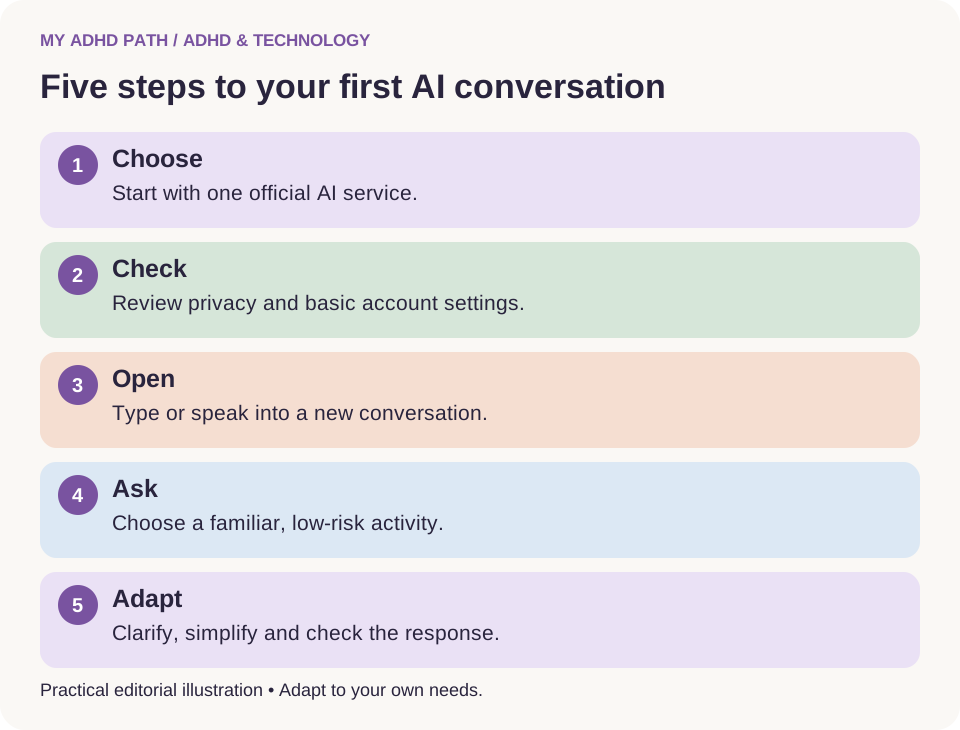
Step one: Choose an assistant
Select one established AI service that you would like to try.
Use its official website or application.
Be cautious about unofficial applications that imitate familiar AI services or advertise misleading subscriptions.
Step two: Review the basic settings
Depending on the service, you may need to create an account.
Explore available privacy settings and check the service's age requirements and terms of use.
You do not need to configure every feature before beginning.
Step three: Open a conversation
You will usually see somewhere to type a message.
Some services also offer voice input.
You can begin with an ordinary question.
Step four: Ask for help with something familiar
Choose a relatively low-risk activity that you understand.
For example, planning a meal, organising a weekend or breaking down a household responsibility.
This gives you an opportunity to evaluate whether the assistant's suggestions make sense.
Step five: Continue the conversation
If the first response isn't particularly useful, explain what you need differently.
Ask for fewer suggestions.
Provide more context.
Request a simpler explanation.
Ask for one action at a time.
You don't need to start again simply because the first response wasn't quite right.
Your first conversation with AI
Imagine you've been meaning to organise a cupboard at home.
You know it needs doing, but every time you think about it, you remember all the other things you need to do.
Try this
Type: "I want to organise my kitchen cupboard, but it feels like a bigger job than I have the energy for. I've got about fifteen minutes. Can you help me get started?"
An assistant might suggest emptying a small section, identifying items that clearly belong elsewhere and putting the remaining items back.
Perhaps that still feels like too much.
You could respond:
"That's still more than I want to do. Give me one thing I can do in the next two minutes."
The assistant might then suggest removing any obvious rubbish from one shelf.
You can continue from there if you want to.
Or you can stop after completing that small activity.
The important thing is that you're not expected to accept the original plan.
You're having a conversation and adapting the support to your needs.
You don't need to write perfect prompts
There is an entire industry devoted to teaching people how to write AI prompts.
Some of that information can be useful, particularly for complex or technical activities.
However, the suggestion that you must learn elaborate prompting techniques before using AI can create an unnecessary barrier.
A prompt is simply something you communicate to the assistant.
It could be:
"Help me organise my day."
"Explain this more simply."
"I don't understand what this email is asking me to do."
"Can you help me compare these two options?"
"I have twenty minutes and don't know where to start."
You can provide further information as the conversation develops.
The assistant may need clarification before offering useful support.
That's perfectly normal.
You haven't failed to use AI because the first question didn't produce the perfect answer.
A simple formula for useful AI conversations
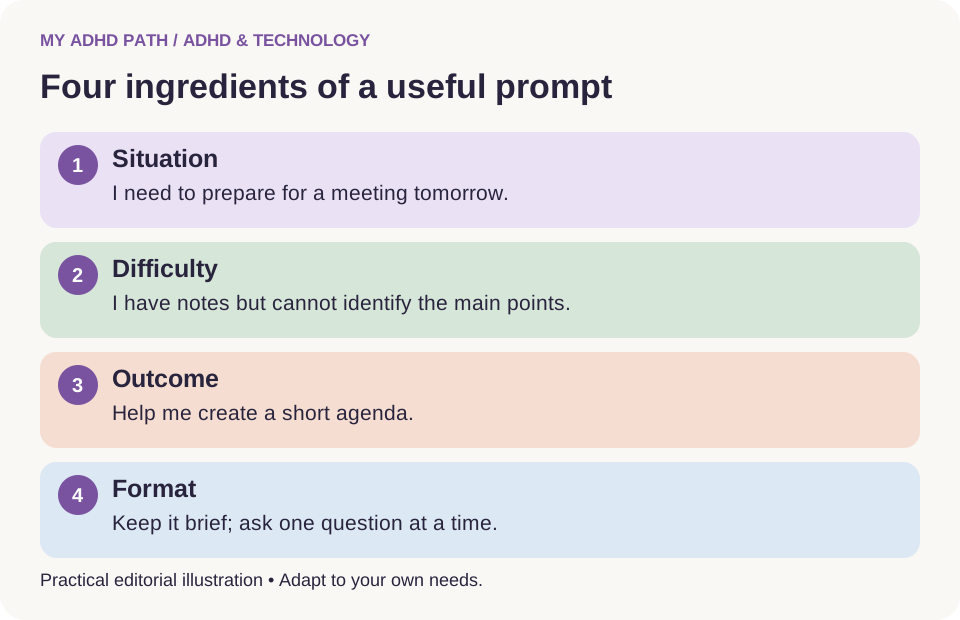
If you would like a little structure, try including four things.
1. The situation
Explain what is happening.
"I need to prepare for a meeting tomorrow."
2. The difficulty
Explain what you need help with.
"I have lots of notes, but I don't know which points are most important."
3. The outcome
Describe what would be useful.
"I want a short agenda and a list of questions."
4. The preferred format
Explain how you would like the answer presented.
"Keep it brief and ask me one question at a time if you need more information."
Putting these together might produce:
"I need to prepare for a meeting tomorrow. I have lots of notes, but I don't know which points are most important. Help me create a short agenda and identify useful questions. Keep it brief and ask me one question at a time if you need more information."
Good to know
This four-part formula is a practical editorial framework. It isn't a requirement for using AI. Sometimes a single sentence will be enough.
Downloadable resource
My First AI Conversation Worksheet
A printable worksheet to help you plan and reflect on your first AI conversations, with space for your situation, difficulty, desired outcome and preferred response format.
Download PDFWhy follow-up questions matter
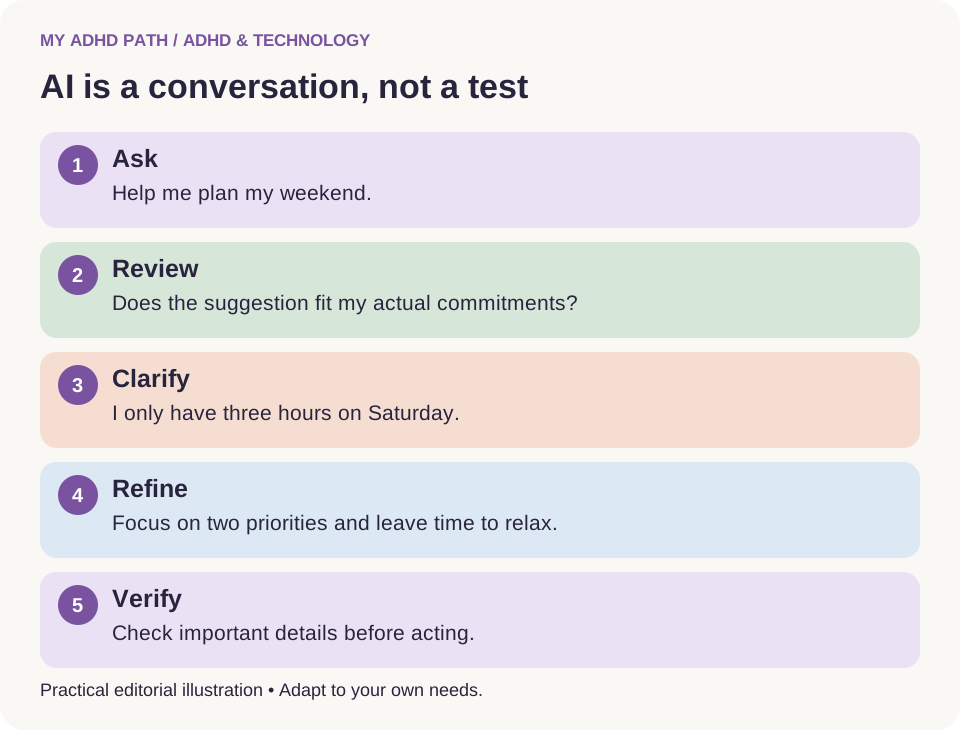
You ask an assistant to help you plan your weekend.
It suggests an elaborate schedule involving a supermarket visit, a household cleaning session, a two-hour walk and several administrative responsibilities.
Unfortunately, you only have Saturday afternoon available.
Rather than dismissing the response, you could explain:
"I only have three hours on Saturday. I also want some time to relax. Can we make this more realistic?"
The assistant can then revise its suggestions.
You might follow up again:
"Actually, the shopping can wait until Monday. Let's focus on the two most important things."
This ability to refine the conversation is one of the reasons AI can be useful for everyday support.
You do not always know exactly what you need before beginning.
Sometimes you discover what would be helpful by working through the situation.
Twelve ways to start using AI in everyday life
1. Organise a collection of thoughts
If you have numerous responsibilities competing for attention, describe them without trying to organise them first.
Try this
"I'm going to give you everything that's on my mind. Help me separate actual responsibilities from ideas and things I can deal with later."
Check that important details have been retained.
2. Find a starting point
If a particular activity feels difficult to begin, ask:
"Help me identify the smallest useful first action. Please don't give me a whole plan yet."
You can ask for the next step when you're ready.
3. Understand a complicated letter
You might have received correspondence that is difficult to interpret.
Using an appropriate service and removing unnecessary personal information, ask:
"Explain what this letter appears to be asking me to do. Identify any dates, actions or information I might need to check."
Compare the result with the original letter.
Good to know
For important legal, financial or medical correspondence, seek suitable professional advice where necessary.
4. Plan an evening meal
You don't necessarily need a complicated meal planning system.
Try:
"I have pasta, tomatoes, spinach and some cheese. Suggest two simple meals using these ingredients that take around twenty minutes."
Tell the assistant about relevant dietary requirements.
Independently check ingredients and suitability where allergies or other medical dietary needs apply.
5. Prepare for an appointment
You may have several things you want to discuss but struggle to organise them.
Try:
"Help me create a short list of questions for an upcoming appointment. Ask me what I want to discuss."
AI can help organise questions without making decisions that require a qualified professional.
6. Break down a household activity
Instead of asking how to clean your entire home, choose a specific responsibility.
Try:
"Help me make my living room feel more manageable in ten minutes. Give me a simple sequence using things I already have."
Adapt the suggestions to your circumstances.
7. Create a realistic shopping list
Explain what you're planning to cook and what you already have.
Ask the assistant to organise the remaining ingredients by category.
Review quantities, dietary requirements and your budget before shopping.
8. Make a message easier to write
Perhaps you know what you want to say but have been putting off writing it.
Try:
"Help me write a friendly message asking whether we can rearrange our appointment. Keep it short and natural."
Read the message yourself before sending it.
9. Understand something unfamiliar
You might be exploring a new subject, helping a child with homework or trying to understand an unfamiliar term.
Try:
"Explain this to somebody who has never studied it before. Use a simple example, then check whether I've understood."
Verify important educational or factual information against suitable sources.
10. Work backwards from a deadline
If you need to complete an activity by Friday, explain what is involved and how much time you have available.
Ask the assistant to help create intermediate stages.
Include breaks and additional time for unexpected difficulties.
11. Compare everyday choices
You might be deciding between several household products or possible travel arrangements.
Explain the criteria that matter to you and ask the assistant to organise the differences.
Check current prices, availability, specifications and other important facts directly.
12. Preserve an idea
If a new idea occurs to you while you're working on something else, ask the assistant to help record it briefly.
Save it somewhere reliable.
You can return to the original activity without feeling that you need to pursue the new idea immediately.
Typing isn't the only way to use AI
Some people find typing helpful because writing encourages them to slow down and organise their thoughts.
Others find that typing introduces another barrier.
Depending on the assistant and device, voice input may offer an alternative.
You could describe a situation aloud rather than constructing a written explanation.
For example:
"I've just got home and I need to sort out dinner, reply to two messages and get some things ready for tomorrow. I've only got forty minutes. Can you help me work out what to do?"
Voice input may be useful when thoughts arrive more quickly than you can comfortably type.
Some assistants also offer spoken responses, allowing you to have a more conversational interaction.
Availability, accessibility and recording arrangements vary between services.
Consider whether you're somewhere private before discussing personal or confidential information aloud.
You can also use your device's existing dictation or text-to-speech features where appropriate.
Using photographs, screenshots and documents
Some AI assistants can work with more than written messages.
Depending on the service, you may be able to upload a photograph, screenshot or document.
For example, you could provide a photograph of your own handwritten revision notes and ask for help organising the topics.
You could upload a screenshot of a non-confidential timetable and ask the assistant to summarise the information.
You could provide a document you have permission to share and ask it to explain unfamiliar terminology.
These features can reduce the amount of information you need to type manually.
However, AI may misread handwriting, overlook information, misunderstand images or generate an incorrect summary.
Check its interpretation against the original material.
Good to know
Before uploading anything, consider whether it contains sensitive information, details about other people or material you are not authorised to share. Avoid uploading identification documents, financial credentials or confidential records to general-purpose AI services unless you have established that the service is appropriate for that use.
Tell your assistant how you want to be supported
An AI assistant may offer long explanations or numerous suggestions.
That might be useful when you're researching something.
It might be considerably less useful when you're already feeling overwhelmed.
You can explain your preferences directly.
For example:
"Please give me a short answer."
"Ask me one question at a time."
"Don't give me any additional suggestions until we've finished this activity."
"Help me understand the reasoning, rather than simply giving me an answer."
"Give me one realistic action I can take now."
"Use a table so I can compare the options."
"Don't turn every thought I mention into something I need to do."
These instructions don't require technical knowledge.
They simply provide the assistant with information about the type of support you would prefer.
Our guide to using AI as an executive functioning assistant explores personalised instructions in more detail.
When you don't know what to ask
Sometimes you know that something feels difficult, but you cannot identify what kind of help would be useful.
You can begin there too.
Try this
"I have several things I need to do, but I can't work out what's making it difficult to start. Ask me one practical question at a time to help me understand where the problem is."
The assistant might ask whether you know which activity is most important.
It might ask whether you're waiting for information.
It might ask how much time you have available.
These questions can help clarify the situation without requiring you to produce a perfectly organised description.
This is practical problem-solving support, not a clinical assessment.
An AI assistant cannot reliably diagnose the reasons behind a person's difficulties.
How to recognise a useful AI response
A response does not become useful simply because it is detailed or sounds intelligent.
Consider whether it actually helps you.
Does it address the question you asked?
Does it make the situation clearer?
Does it respect the constraints you provided?
Can you verify the important information?
Does it help you identify an appropriate next action?
Does it leave you with less unnecessary information to manage?
If the answer is no, ask the assistant to adapt its approach.
You might say:
"This is more complicated than I need. Can you simplify it?"
Or:
"You've suggested several things that don't fit my circumstances. Ask me what constraints I have before trying again."
You remain in control of the conversation.
Five common beginner mistakes
1. Expecting one perfect response
AI may need additional context before providing useful support.
Treat the interaction as a conversation rather than a single question with one definitive answer.
2. Trying too many assistants at once
Comparing every available application can quickly become another project.
Choose one initially and evaluate it through real activities.
3. Assuming confidence means accuracy
AI can generate incorrect information in a confident, polished style.
Check important facts regardless of how convincing the answer sounds.
4. Sharing more information than necessary
You don't need to disclose your medical history, financial records or private family information to receive simple planning support.
Provide only the context needed for the activity.
5. Attempting to organise your entire life immediately
You don't need to create a complete AI-powered organisational system on your first day.
Begin with something small enough to understand and evaluate.
Why AI sometimes gets things wrong
Generative AI systems create responses using patterns learned during training and information available to them at the time.
Depending on the system, they may also use external tools or retrieve information from additional sources.
They do not always establish whether every statement they generate is correct.
As a result, AI may produce:
- Incorrect dates.
- Invented references.
- Misleading explanations.
- Inaccurate calculations.
- Outdated information.
- Summaries that omit important details.
- Suggestions based on assumptions rather than facts.
This is sometimes described as an AI hallucination.
The assistant may not recognise that the information is wrong.
Asking whether it is certain does not guarantee a reliable correction.
Good to know
Where accuracy matters, compare the information with an authoritative external source. For example, verify a government deadline using the relevant official website rather than relying entirely on an AI response.
Can AI access the internet?
Some AI assistants can search or retrieve information from the internet.
Others may not have that capability in a particular conversation.
Even when an assistant can access online information, it may not have searched for the answer you've received.
If you require current information, ask whether the assistant can check reliable sources and provide links.
Then follow those links and establish whether they support the conclusion.
This is particularly important for prices, regulations, medical guidance, travel plans and services that may change.
An assistant with internet access can still misunderstand or inaccurately summarise a source.
Does AI remember what I tell it?
Different assistants handle conversation history and memory differently.
Within a conversation, the assistant may be able to refer to information you've already provided.
Some services may also retain selected information across conversations, depending on your settings and available features.
However, it may forget, misunderstand or overlook details.
Do not assume that the assistant will remember every responsibility, deadline or personal preference.
If something is important, retain it in an appropriate external record.
You can ask the assistant to summarise information for you to save.
You can also provide an updated summary when beginning a new conversation.
Review memory and privacy settings directly within the service you choose.
Will AI actually do things for me?
That depends on the assistant, its available tools and any permissions you have granted.
There are three useful distinctions.
Suggest: An assistant tells you what you could do.
Prepare: An assistant creates a draft, plan or other material for you to review.
Perform: An assistant uses an available tool or authorised connection to carry out an action.
For example, asking an assistant to write an email may produce a draft.
It does not necessarily send the email.
Similarly, asking for a reminder may produce a suggestion rather than a scheduled notification.
Confirm whether the action has actually occurred.
When granting permissions, consider what the assistant needs access to and whether you are comfortable with that access.
Important actions should remain subject to appropriate review and authorisation.
AI and your privacy: six things to check
You do not need to understand every detail of cybersecurity to develop safer habits.
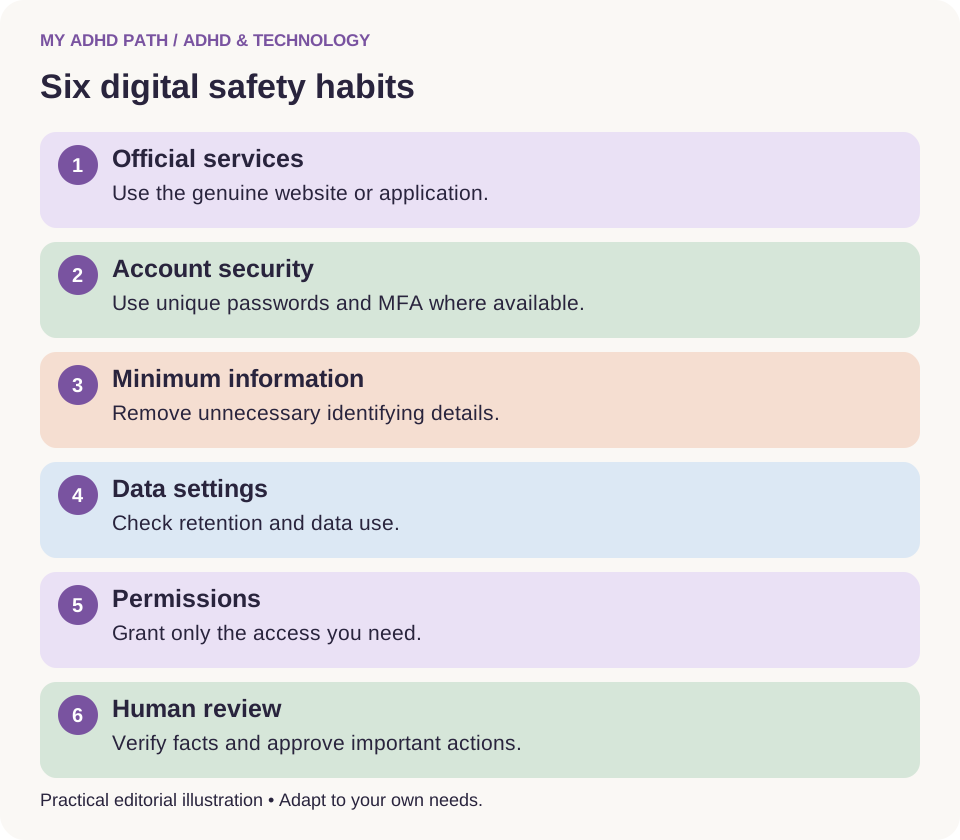
Start with these six considerations.
1. Use official services
Access the assistant through its official website or recognised application.
Be cautious about misleading advertisements and imitation services.
2. Protect your account
Use a strong, unique password and multifactor authentication where available.
3. Share only necessary information
Remove unnecessary names, addresses, account numbers and identifying details from examples.
4. Check data settings
Find out how the provider handles conversations, uploaded files, retention and data use.
5. Review connected services
Only grant access that is appropriate for the activity you want to support.
6. Keep important decisions under your control
Review messages, documents, purchases and other consequential activities before allowing an assistant to carry them out.
These steps cannot eliminate every risk, but they provide a useful starting point.
Our dedicated AI, ADHD, Privacy and Digital Safety guide explores this subject in greater depth.
Do I need to tell AI that I have ADHD?
No.
You can disclose that information if you choose, but it is not necessary to receive practical support.
Instead, you might describe your preferences.
"I find lengthy lists difficult to work through."
"I need help turning complicated activities into specific actions."
"I prefer information presented in short stages."
"I need realistic estimates and help identifying priorities."
These instructions can be useful regardless of whether you have an ADHD diagnosis.
You can choose how much personal information you want to share.
Three fictional beginner experiences
Illustrative scenario
Helen, 52 - Starting with voice input
Helen has heard a great deal about AI but feels uncertain about what she is supposed to type. She discovers that her chosen assistant supports voice input. Instead of writing a detailed question, she describes the household responsibilities she needs to organise that afternoon. The assistant proposes a plan. Helen asks for a shorter version with more realistic timings. She begins using AI occasionally for everyday planning rather than attempting to introduce it into every aspect of her life.
Illustrative scenario
Jamie, 31 - Getting help with paperwork
Jamie has several administrative activities he's been intending to complete. He starts by asking an assistant to help identify which information he needs before completing a particular form. He works through the activity one stage at a time. He checks the official instructions himself and avoids uploading sensitive documents. The assistant provides organisational support without completing responsibilities that require his own judgement.
Illustrative scenario
Priya, 19 - Using AI to understand rather than copy
Priya is studying at college and finds some explanations in her course materials difficult to follow. She asks an assistant to explain unfamiliar concepts using simple examples. Once she understands the explanation, she attempts practice questions independently. She checks important details against her textbook and follows her college's rules about AI use. The technology supports her learning rather than replacing it.
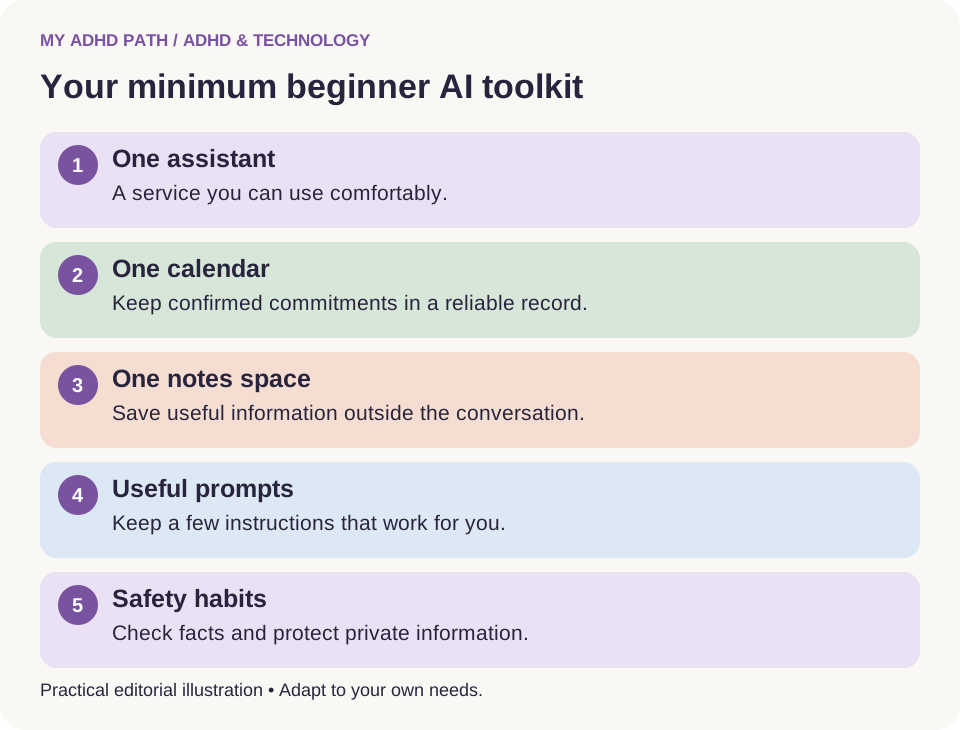
Creating your beginner AI toolkit
You don't need a large collection of applications.
Your beginner toolkit might consist of:
- One AI assistant you can access comfortably.
- One existing calendar for important commitments.
- One reliable place to save useful notes.
- A small collection of prompts that work for you.
- A basic understanding of privacy and information checking.
That's enough to begin exploring.
Your toolkit can grow if you discover additional needs.
You may also find that some existing applications are more useful for certain activities than AI.
A calculator remains useful for straightforward calculations.
A calendar remains useful for confirmed appointments.
A secure password manager remains more appropriate for storing credentials.
AI does not need to replace every other tool.
Is AI worth using if you have ADHD?
There isn't a universal answer.
Some people may find conversational AI helpful because it allows them to begin with unstructured information and receive adaptable responses.
Others may find the responses too lengthy, inaccurate or distracting.
Some people may prefer traditional organisational tools, human support or a combination of different approaches.
What the research says
The evidence supporting executive functioning difficulties in ADHD is well established, although individual experiences vary. Research into cognitive offloading also helps explain why external resources can support some cognitive activities. However, these research findings do not establish that general-purpose AI assistants treat ADHD or improve underlying cognitive functioning. Direct research into the benefits and limitations of everyday generative AI support for people with ADHD remains an emerging area.
The most appropriate starting point is to evaluate whether the technology helps with a particular practical activity in your own circumstances.
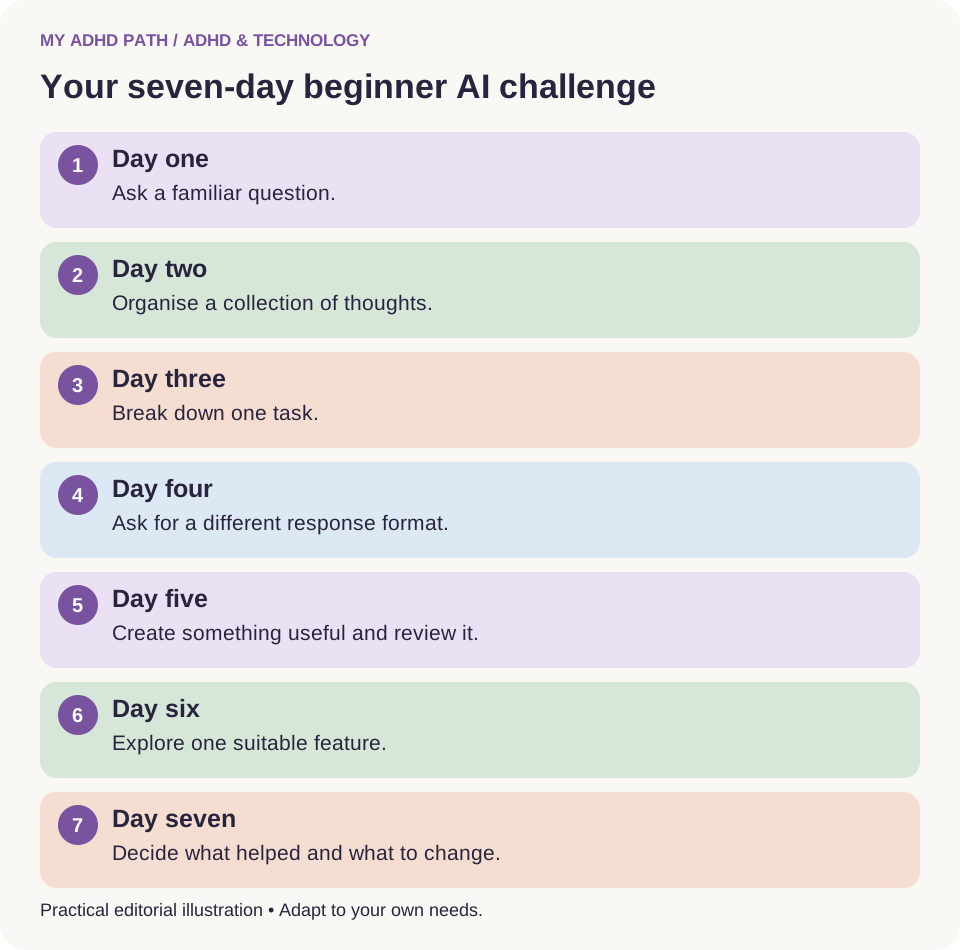
Your seven-day beginner AI challenge
You do not need to spend hours learning about AI.
Try one small activity each day.
Day one: Ask a familiar question
Ask about something you already understand reasonably well.
Notice whether the answer is clear and accurate.
Day two: Organise your thoughts
Describe several everyday responsibilities and ask the assistant to organise them.
Check that it hasn't introduced information you didn't provide.
Day three: Break down a task
Choose one activity you have been finding difficult to approach.
Ask for one practical starting action.
Day four: Change the response
Ask for an explanation, then request a shorter or more accessible version.
Notice how the interaction changes.
Day five: Create something useful
Prepare a shopping list, a simple template or a message you need to send.
Review the result before using it.
Day six: Explore one feature
If available and appropriate, try voice input, a non-sensitive document upload or another accessibility feature.
Day seven: Decide what helped
Review the previous six days.
Which activities felt easier?
Which responses created more work?
What would you like the assistant to do differently?
You can continue with the approaches that help and leave the others behind.
Good to know
This is an informal technology experiment, not an ADHD symptom assessment. You may find some uses of AI considerably more helpful than others.
Your first fifteen AI prompts
Save the prompts you find useful.
There is no need to remember all of them.
AI prompt
My first conversation
"I've never used AI before. Help me understand what you can do using simple examples relevant to everyday life."
AI prompt
Organise my thoughts
"I'm going to tell you everything that's on my mind. Help me organise it without turning every thought into a task."
AI prompt
Help me get started
"I know what I need to do, but I'm finding it difficult to start. Give me one small, specific action."
AI prompt
Explain this simply
"Explain this using everyday language and one clear example."
AI prompt
Plan my afternoon
"Help me create a realistic plan based on the time I have available. Ask me what commitments I already have."
AI prompt
Reduce the options
"I have too many choices. Help me compare the options using the things that matter most to me."
AI prompt
Help me write this message
"Help me write a short, friendly message that communicates the following information."
AI prompt
Simplify this information
"Summarise the main points. Identify anything that needs checking and don't invent missing information."AI prompt
Make this activity manageable
"Break this responsibility into small stages. Show me only the first stage initially."
AI prompt
Help me remember where I stopped
"Create a short summary of what I've completed, what remains outstanding and where I should begin next time."
AI prompt
Prepare for tomorrow
"Help me identify what I need to prepare for tomorrow. Keep it practical and include only relevant information."
AI prompt
Check my plan
"Review this plan and tell me whether it seems realistic. Consider breaks, existing commitments and unexpected delays."
AI prompt
Ask me questions
"I'm not sure what information you need. Ask me one question at a time before suggesting a solution."
AI prompt
Help me verify this
"Identify which parts of this information need independent verification. Suggest appropriate authoritative sources."
AI prompt
Adapt to my preferences
"Please keep your responses clear and manageable. If I ask for help completing an activity, focus on the next useful step rather than presenting an enormous list."
You can reuse and adapt these prompts whenever they are helpful.
Frequently asked questions
What is the easiest AI tool for somebody with ADHD?
There is no universally easiest assistant. Start with an established service that offers an interface and response style you find accessible.
Can I use AI without technical knowledge?
Yes. Conversational AI is designed to accept ordinary language. Technical knowledge may be useful for advanced applications but is unnecessary for basic conversations.
Is AI free to use?
Many providers offer free access, subject to their current terms, features and usage limits.
Do I need to pay for ChatGPT or another assistant?
Not necessarily. Begin with free access if available and consider a subscription only when you identify a genuine need for additional features.
What should I ask AI first?
Choose a familiar, low-risk activity. Planning a meal, organising a small task or explaining an unfamiliar concept can be useful starting points.
What if I ask the wrong question?
You can clarify, correct or rephrase your question. There is no requirement to get it right on the first attempt.
Can I speak to AI instead of typing?
Some assistants support voice input or spoken conversations. Your device may also provide dictation and text-to-speech features.
Can AI help me organise my ADHD thoughts?
It may help structure information you provide, separate ideas from actions and identify possible next steps. Effectiveness varies between individuals.
Can AI diagnose ADHD?
No. A general-purpose AI assistant cannot provide a reliable clinical ADHD diagnosis. Assessment requires appropriately qualified professionals.
Is AI always accurate?
No. AI can produce incorrect, outdated or invented information. Important facts should be verified independently.
Can I upload documents to AI?
Some services support document uploads. Check privacy arrangements, permissions and confidentiality requirements first.
Does AI remember previous conversations?
This depends on the service and your settings. Memory and conversation history should not be treated as infallible records.
Is it safe for children to use AI?
Suitability depends on the service, age requirements, parental guidance, safeguarding arrangements and the nature of the activity.
Can AI help with studying?
AI can help explain concepts, create practice activities and organise information. Students should verify accuracy, develop independent understanding and follow educational rules.
Is AI a replacement for ADHD treatment?
No. General-purpose AI assistants are not established clinical ADHD treatments. They may offer practical assistance alongside appropriate care.
Can AI make my life more complicated?
Yes. Overly complex workflows, inaccurate responses and excessive reliance on new applications can introduce additional work. Evaluate whether the technology genuinely meets your needs.
Start with something real
You don't need to understand how artificial intelligence works to start discovering how it could work for you.
You don't need to have an AI strategy.
You don't need to know which language model you're using.
You don't need to understand automation, agents or integrations.
Those subjects can wait until they become relevant to something you want to do.
For now, think about an everyday responsibility that could be a little easier.
Something you haven't quite managed to organise.
Something you've been intending to understand.
Something that would benefit from a clearer starting point.
Open a conversation.
Explain the situation.
Ask for help.
See whether the response is useful.
And if it isn't, ask again in a different way.
Learning to use AI doesn't need to become another enormous project.
It can simply begin with a conversation.
Official AI assistant websites
The following links are provided for readers who wish to explore established general-purpose AI assistants. Their inclusion is not a ranking, clinical recommendation or endorsement.
- ChatGPT: https://chatgpt.com/
- Claude: https://claude.ai/
- Gemini: https://gemini.google.com/
- Microsoft Copilot: https://copilot.microsoft.com/
Good to know
Check each provider's current features, pricing, age restrictions and privacy arrangements before use.
Sources and further reading
- Diamond, A. (2013). Executive functions. Annual Review of Psychology. https://doi.org/10.1146/annurev-psych-113011-143750
- Risko, E. F. and Gilbert, S. J. (2016). Cognitive offloading. Trends in Cognitive Sciences. https://doi.org/10.1016/j.tics.2016.07.002
- Faraone, S. V. et al. (2021). The World Federation of ADHD International Consensus Statement: 208 evidence-based conclusions about the disorder. https://doi.org/10.1016/j.neubiorev.2021.01.022
- NICE - Attention deficit hyperactivity disorder: diagnosis and management (NG87). https://www.nice.org.uk/guidance/ng87
- National Institute of Standards and Technology - AI Risk Management Framework. https://www.nist.gov/itl/ai-risk-management-framework
- Information Commissioner's Office - UK data protection guidance. https://ico.org.uk/
- National Cyber Security Centre. https://www.ncsc.gov.uk/
This article provides general educational information and practical suggestions. It does not constitute medical advice or recommend AI as an ADHD treatment. Individual experiences vary. All personal scenarios and practical frameworks are illustrative.