

What if you didn't have to explain how you work, what you're trying to achieve and where you left off every single time you asked for help?
Imagine beginning your working day with an assistant that already has information about your current projects.
It knows which responsibilities you've been working through.
It has access to your preferences about how information should be presented.
It understands that you don't particularly benefit from enormous lists of tasks when you're trying to establish where to begin.
It can help you reconstruct what happened yesterday, identify what still needs attention and explore what might be realistic today.
And when you suddenly have an idea for something completely unrelated, it can help you preserve that idea without automatically turning it into another project.
For some people with ADHD, this kind of support could be particularly valuable.
Not because the technology takes responsibility for your life.
Not because it makes every decision for you.
But because it can help reduce the work involved in repeatedly organising, explaining and reconstructing information.
You don't necessarily need to build a piece of software to achieve this.
You can begin with an existing AI assistant, a few carefully considered instructions and a reliable way of maintaining important information.
From there, you can develop a system that increasingly reflects your individual needs.
At a glance
- You can create a personalised AI assistant without learning to code.
- Personalisation begins with explaining your preferences and practical support needs.
- Persistent instructions and memory features may reduce repeated explanations.
- Separate project spaces can help preserve relevant context.
- Important information should also exist outside AI conversations.
- Connected applications and automation can extend an assistant's capabilities.
- More access and autonomy introduce additional security and privacy responsibilities.
- Start with a simple assistant and expand only when additional features address a genuine need.
- AI should support your independence rather than replace your judgement.
What is a personalised AI assistant?
A personalised AI assistant is an AI system configured or instructed to provide support that reflects your particular circumstances, preferences and objectives.
Instead of beginning every interaction with entirely generic instructions, you can establish a consistent way of working.
Your assistant might have information about:
- How you prefer explanations to be presented.
- The kinds of activities you regularly need help with.
- Your current projects.
- Your approach to planning.
- Your preferred communication style.
- The responsibilities you want to prioritise.
- The boundaries you want the assistant to respect.
Depending on the platform, this information may exist in saved instructions, project documents, memory features or conversations.
The assistant uses the context available to it to generate more relevant responses.
Good to know
This doesn't mean the assistant understands you in the same way a person does. It doesn't mean its memory is perfect. And it doesn't guarantee that every response will reflect your preferences accurately. Personalisation is a way of providing better context, not a guarantee of complete understanding.
Why personalisation matters when you have ADHD
One of the less obvious demands of receiving support is explaining what you need in order to receive it.
You might have to explain the background to a project.
Describe which activities are outstanding.
Identify what you've already tried.
Clarify why previous suggestions weren't useful.
Explain how you prefer to receive information.
For somebody who is already finding it difficult to organise their thoughts, this can become another demanding activity.
Imagine repeatedly asking an assistant for help with planning and repeatedly receiving a long list of activities.
Each time, you need to explain that the problem isn't recording tasks.
You need help identifying priorities, understanding dependencies and finding a manageable starting point.
A personalised assistant can begin with those preferences already available, where the platform supports them.
This may reduce the amount of repeated explanation required.
It also creates an opportunity to establish continuity between conversations.
You don't need to build your own AI model
When people hear about creating a personal AI assistant, they sometimes imagine that it involves computer programming, expensive hardware or specialist technical knowledge.
Those are possible approaches, but they are not necessary for most people.
There are several different ways to create personalised AI support.
| Approach | What it involves |
|---|---|
| Conversational assistant | Giving instructions within an ordinary AI conversation |
| Personalised assistant | Saving preferences or persistent instructions |
| Project-based assistant | Using dedicated spaces with relevant documents and instructions |
| Custom assistant | Configuring a reusable assistant for a particular role |
| Connected assistant | Giving an assistant authorised access to selected external services |
| Self-hosted assistant | Running or managing an AI system on your own hardware or server |
You can begin at the simplest level.
A well-instructed conversational assistant may provide all the practical support you need.
The more advanced approaches become relevant when you identify specific limitations in your existing arrangement.
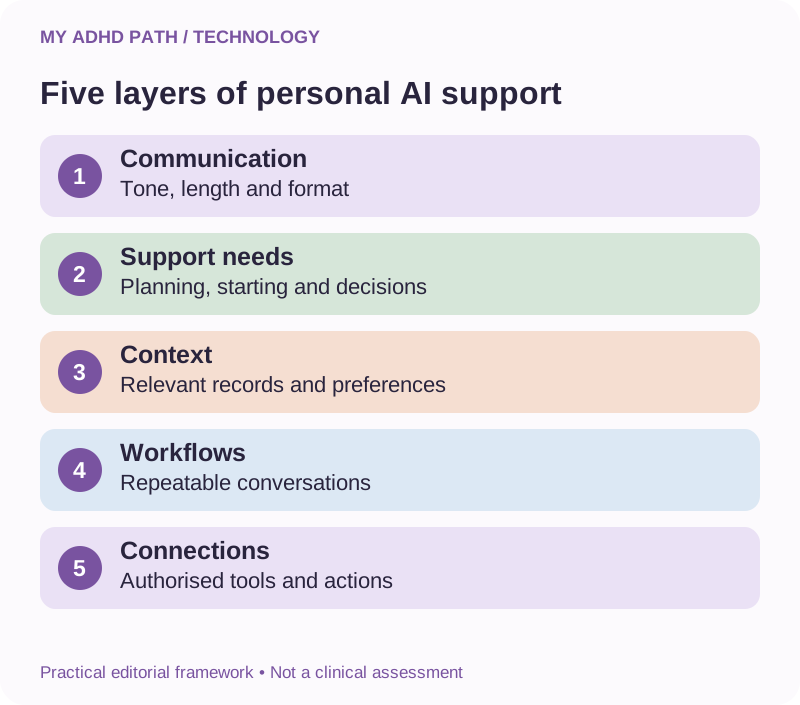
The five layers of a personal AI assistant
The following framework provides a practical way to think about building your assistant.
Good to know
This is a My ADHD Path editorial framework rather than an established clinical or technical standard.
Layer one: Personality and communication
Establish how you want the assistant to communicate.
This includes response length, tone, level of detail and whether you prefer information presented in stages.
Layer two: Practical support needs
Explain the activities you want assistance with.
These might include planning, prioritisation, working memory support, decision-making or maintaining project continuity.
Layer three: Context and knowledge
Provide relevant information about your responsibilities, preferences, projects and routines.
Keep important information accurate and up to date.
Layer four: Workflows
Establish repeatable ways of working together.
Examples include a morning planning conversation, a weekly review or a project restart summary.
Layer five: Connections and actions
Where appropriate, introduce authorised integrations that allow the assistant to retrieve information or carry out agreed activities.
Good to know
These five layers can be developed gradually. You don't need to complete every layer before the assistant becomes useful.
Step one: Decide what you actually want help with
Before exploring features, subscriptions or integrations, establish what you want your assistant to support.
Try this
Begin by completing the following sentence: "I would find everyday life easier if I had help with..."
Perhaps your answer involves remembering commitments.
Perhaps it's maintaining an overview of several projects.
Perhaps it's organising household responsibilities.
Perhaps it's deciding what to do when everything feels equally important.
The more clearly you understand your needs, the easier it becomes to establish useful instructions.
| Practical difficulty | Possible assistant role |
|---|---|
| Too many competing responsibilities | Planning and prioritisation assistant |
| Forgetting where you left off | Project continuity assistant |
| Difficulty starting activities | Step-by-step task support |
| Complicated information | Information and explanation assistant |
| Repetitive administration | Workflow and administrative support |
| Too many options | Decision support assistant |
| Managing family commitments | Household organisation assistant |
| Organising learning | Study and revision assistant |
You may want one assistant to fulfil several roles.
Alternatively, you may prefer separate assistants for very different activities.
Start with the role that would make the greatest practical difference.
Step two: Create your personal instruction profile
Imagine employing a new human assistant.
You would probably want to explain how your working day operates, what support you need and how you prefer responsibilities to be managed.
Personalising an AI assistant involves a similar process.
You can begin by describing how you prefer to work.
For example:
What you could say
"I regularly work across several projects. I need help maintaining continuity and identifying what needs attention. Please distinguish between active projects, future ideas and activities that are waiting for someone else."
You might also explain what isn't useful.
What you could say
"Please avoid giving me a long list of additional tasks when I'm trying to complete an existing activity."
Or:
What you could say
"When I ask for help making a decision, don't simply describe every available option. Help me compare them against the things that matter to me."
These instructions can help establish a more productive interaction.
They don't need to contain a diagnostic label or sensitive health information.
You can focus entirely on practical preferences.
Personalisation is a way of providing better context, not a guarantee of complete understanding.
A ready-to-use personal assistant instruction template
The following instructions provide a starting point for creating your own assistant.
Adapt them to reflect what works for you.
My personal AI assistant
- Your role is to help me organise information, maintain continuity, work through decisions and manage everyday responsibilities more effectively.
- I want you to support my thinking and independence rather than make important decisions on my behalf.
How to communicate with me
- Use clear, straightforward language.
- Avoid unnecessary explanations when I'm trying to complete a practical activity.
- Ask one question at a time when clarification is needed.
- Provide more detail when I explicitly request it.
- Distinguish essential information from optional suggestions.
How to support my planning
- Consider actual deadlines, consequences and dependencies.
- Help me identify what needs attention now and what can wait.
- Separate new ideas from existing commitments.
- Consider my available time and capacity.
- Include realistic breaks and contingency time.
- Challenge plans that appear overloaded.
How to help me complete activities
- Identify the next practical action.
- Break complicated activities into manageable stages.
- Avoid introducing unrelated work while we're completing something.
- Help me identify missing information and obstacles.
- Record important decisions and progress accurately.
How to maintain continuity
- Refer to relevant information that is available to you.
- Tell me when you cannot access previous details.
- Do not invent information about earlier conversations.
- Help me create summaries that I can save externally.
- Distinguish agreed decisions from suggestions.
How to protect my independence and privacy
- Make assumptions explicit.
- Verify important facts where possible and explain uncertainty.
- Do not claim to have completed external actions unless they have actually occurred.
- Obtain appropriate approval before consequential actions.
- Do not request unnecessary sensitive information.
- Encourage qualified professional support where appropriate.
Good to know
The objective is to make everyday life more manageable, not to maximise productivity at the expense of your wellbeing. You can paste these instructions into a conversation or, where supported, save them within your chosen assistant's personalisation settings. Review them periodically as you discover which approaches genuinely help.
Step three: Decide what information your assistant needs
Common misconception
A common misconception is that an effective personal assistant needs to know everything about you. In reality, usefulness often depends on having relevant information rather than having as much information as possible.
For example, if you want support planning your working day, your assistant might benefit from knowing your working hours, current deadlines and communication preferences.
It probably doesn't need details of your medical history.
If you want help organising a business project, the assistant might need the project's objectives, current progress and outstanding decisions.
It doesn't necessarily need access to your entire email account.
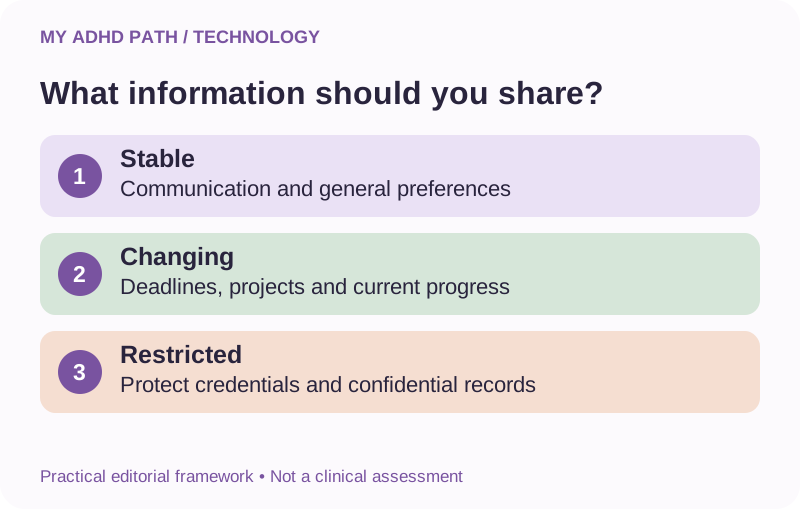
Consider dividing information into three categories.
Relatively stable information
These are details that are unlikely to change frequently.
Examples include communication preferences, general working arrangements and recurring support needs.
Changing information
These are details that require regular updates.
Examples include active projects, current deadlines, available time and outstanding decisions.
Restricted information
These are details that require particular care or should not be shared with an unsuitable service.
Examples include passwords, authentication codes, confidential records, financial credentials and sensitive personal information.
Good to know
The assistant does not need unrestricted access to be useful. Provide the context necessary for the support you want.
Step four: Understand the different types of AI memory
Memory can be one of the most valuable aspects of personalised AI support.
It can also be one of the easiest features to misunderstand.
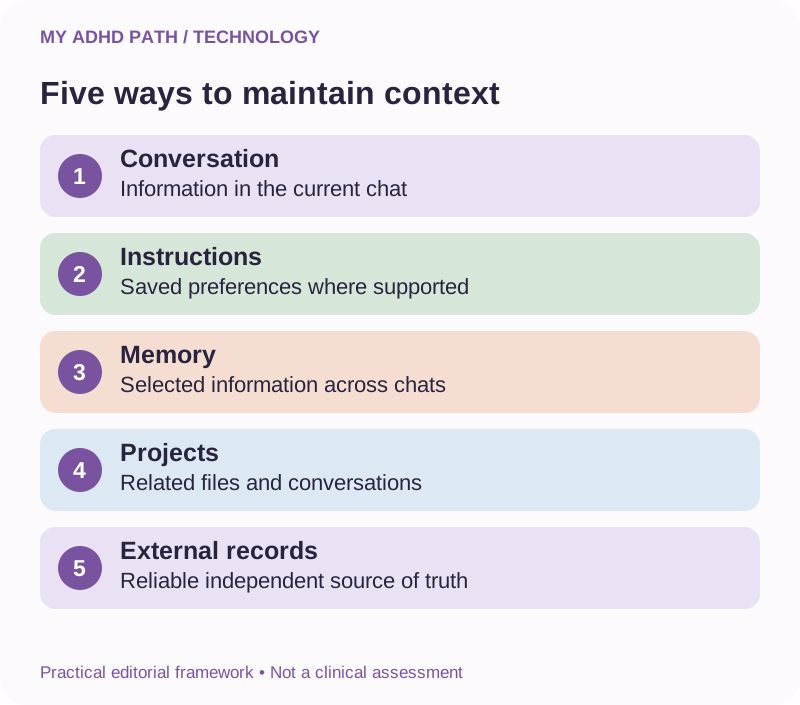
Different AI platforms use different methods to maintain information.
These methods are not interchangeable.
Conversation context
Within an individual conversation, an assistant may use earlier messages to provide continuity.
However, very long conversations can exceed the information the system can process directly.
Earlier details may become unavailable or be represented through summaries.
Saved preferences and instructions
Some assistants allow you to retain instructions that influence future conversations.
These may include your preferred response style, general objectives or practical working requirements.
Persistent memory
Some AI services can retain selected information between conversations.
The way information is selected, stored, recalled and managed varies between providers.
Project context
Some assistants provide dedicated spaces where related conversations, documents and instructions can be grouped.
These may help preserve information about a specific activity or ongoing project.
External records
Documents, spreadsheets, calendars, databases and other information systems can provide more explicit records.
An assistant may help work with these records when you provide them or authorise suitable access.
Good to know
The important distinction is that the assistant's memory and your actual records are not necessarily the same thing. Use memory to support continuity. Use reliable records to preserve information that genuinely matters.
Your assistant's memory is not your filing system
Use memory to support continuity. Use reliable records to preserve information that genuinely matters.
Imagine you've spent several weeks discussing a business idea with an AI assistant.
You have explored potential names, considered pricing, compared technologies and made decisions about how the project should develop.
One morning, you ask the assistant to continue from where you left off.
It recalls some of the information.
Other details are missing.
Some of the suggestions it provides are based on decisions you changed several days ago.
This is a frustrating experience.
But it illustrates why important information should not exist solely within conversations.
Try this
At suitable points, ask the assistant to create a project summary. Save that summary in a reliable location. Update it when significant decisions change. Your external project summary becomes the reference point. The assistant helps you work with it.
This is particularly important for business projects, financial information, contractual commitments, educational work and other activities where accuracy and continuity matter.
Step five: Create dedicated project spaces
If you're managing several different areas of life, it can be useful to establish separate spaces for related information.
For example:
| Project space | Information it might contain |
|---|---|
| Everyday life | Appointments, household planning and personal administration |
| Work | Current responsibilities, meeting notes and work-related planning |
| Business | Strategy, project documents, decisions and operational procedures |
| Learning | Study material, revision plans and practice activities |
| Future ideas | New possibilities that are not current commitments |
Some AI assistants provide dedicated project features.
Others may be used alongside ordinary folders, notes or documents.
Project spaces can help limit unnecessary information and establish clearer boundaries between activities.
But be careful not to create an elaborate system that requires constant maintenance.
You may only need two or three broad areas.
If the structure becomes another thing you're struggling to manage, simplify it.
Give every project a starting point
Imagine creating a dedicated project space for a website you're developing.
Rather than filling it with every document and conversation you've ever had about the website, begin with a concise project overview.
Project overview template
- Project name: What is the project called?
- Objective: What are we trying to achieve?
- Current stage: Where are we now?
- Agreed decisions: What has already been established?
- Completed work: What has actually been finished?
- Outstanding work: What remains to be completed?
- Waiting for: What cannot progress without further information?
- Constraints: What are the relevant deadlines, costs, permissions or limitations?
- Next action: Where should we begin?
- Last updated: When was this information reviewed?
This structure makes it easier to re-establish context.
It can also help distinguish completed work from work that has merely been discussed.
Keep the information concise enough to review without creating another demanding administrative responsibility.
Step six: Establish repeatable workflows
An assistant becomes more useful when it can support activities you regularly need to complete.
You don't necessarily need complex automation.
Sometimes a familiar conversation structure is sufficient.
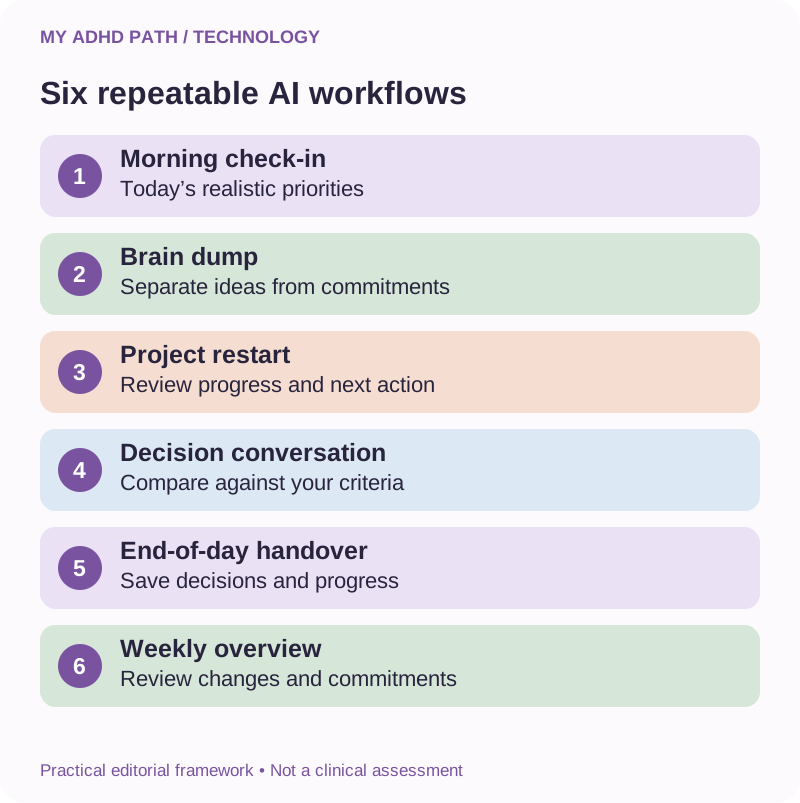
Here are six practical workflows to consider.
Workflow one: The morning check-in
Begin by establishing what is happening today.
Provide information about appointments, deadlines, unfinished activities and available time.
Ask your assistant to help identify:
- What needs attention today.
- Which activities are waiting for someone else.
- What can realistically fit into the available time.
- One useful starting action.
A good morning check-in should leave you with a clearer view of the day.
It should not require half the morning to complete.
Workflow two: The brain dump
Use this when numerous ideas and responsibilities are competing for attention.
Record everything without attempting to organise it first.
Ask your assistant to distinguish actual responsibilities, new ideas, reference information and unresolved questions.
Then decide which items need attention.
The purpose of the brain dump is to create space, not manufacture an enormous new collection of commitments.
Workflow three: The project restart
Use this when returning to an activity you've previously been working on.
Provide the latest project summary.
Ask the assistant to establish what has been completed, what has changed and what the next practical action should be.
Verify the summary against your actual project records.
This can reduce the need to reconstruct the entire project before resuming work.
Workflow four: The decision conversation
Use this when you're comparing several options.
Explain what you are trying to achieve and which factors matter to you.
Ask the assistant to identify relevant differences, assumptions and missing information.
Work through the decision rather than simply collecting every possible option.
Important decisions still require your judgement and appropriate professional advice where relevant.
Workflow five: The end-of-day handover
Before finishing for the day, ask your assistant to help record what happened.
Capture completed activities, significant decisions, unresolved questions and your suggested starting point for tomorrow.
Save the handover somewhere reliable.
You don't need to maintain a lengthy diary of everything you accomplished.
A few accurate sentences may be sufficient.
Workflow six: The weekly overview
Review your current responsibilities and projects at a suitable point during the week.
Ask your assistant to help identify outstanding commitments, changed circumstances, approaching deadlines and activities that no longer need attention.
Review whether your plans reflect the time and capacity available.
The weekly overview can also provide an opportunity to revisit ideas you previously decided not to pursue immediately.
Step seven: Make your assistant adaptable
You probably don't need the same type of support every day.
On one day, you might enjoy an extensive strategic discussion.
On another, you might find a detailed explanation difficult to process.
An effective personal assistant arrangement should allow you to request different levels of support.
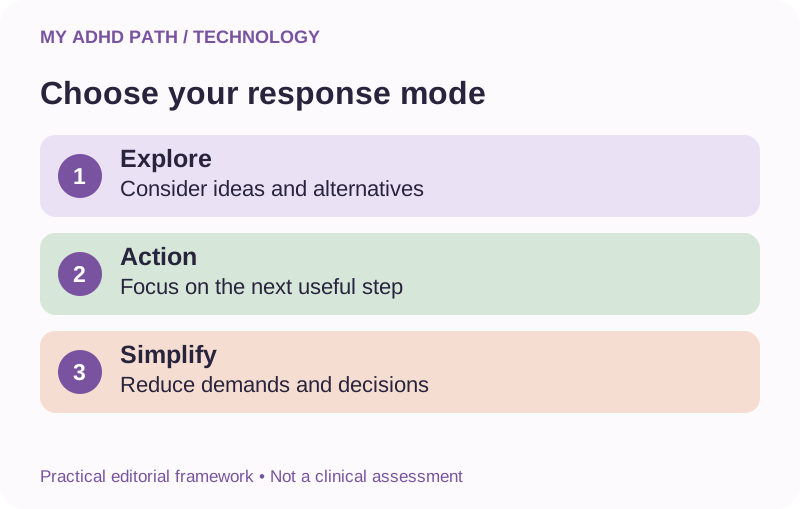
Consider creating three simple modes.
Explore mode
Use this when you want to develop ideas, research possibilities, compare approaches or understand a subject in greater detail.
Ask for thoughtful analysis, relevant alternatives and useful questions.
Action mode
Use this when you are ready to complete something.
Ask for a clearly defined next action, practical instructions and minimal unrelated information.
Simplify mode
Use this when your capacity is limited or you are managing too many competing demands.
Ask for essential priorities, fewer decisions and a manageable starting point.
Try this
You could simply tell your assistant: "I'm in action mode today." Or: "Switch to simplify mode. I don't need another large plan." These modes are informal preferences, not clinical measures of functioning. The point is to make the assistant responsive to your current needs rather than expecting yourself to adapt to the same interaction style every day.
Step eight: Connect other applications only when useful
Once you have established a simple personalised assistant, you may discover activities that could benefit from additional information or authorised connections.
For example, your assistant might be more useful for daily planning if it can retrieve relevant calendar commitments.
It might help maintain project continuity if it can access selected project documents.
It might support administrative activities if it can work with an approved email or task management service.
Availability depends on the assistant, your subscription, the connected application and the permissions involved.
Before connecting anything, ask:
- What activity would this connection support?
- What information would the assistant gain access to?
- Can access be limited to what is necessary?
- Can the assistant only read information, or can it also change things?
- How can I review actions and revoke access?
- Is this connection appropriate for the information involved?
Avoid connecting services simply because the feature is available.
A connection should solve a problem you have identified.
Reading information is different from changing it
Consider the difference between an assistant that can review your calendar and one that can rearrange your appointments.
Both may be useful.
But the second introduces additional responsibility.
The same applies to email.
There is a significant difference between helping you understand an email, drafting a response and sending that response automatically.
There is also a difference between suggesting that a file is no longer required and deleting it.
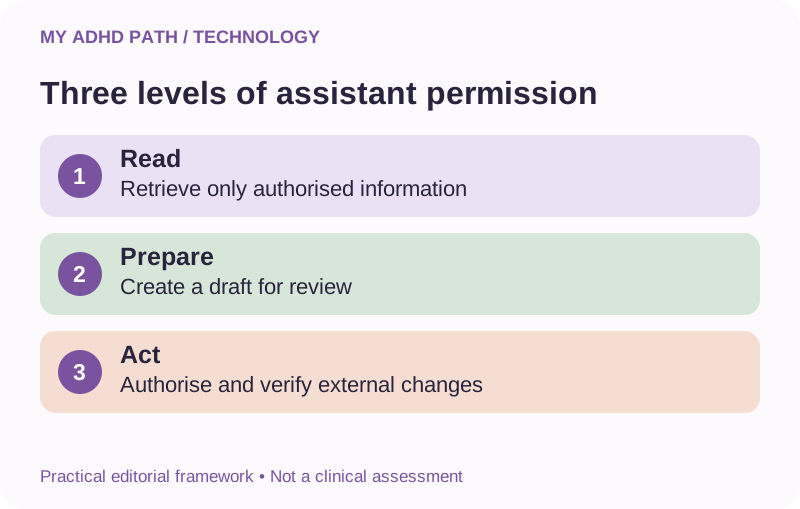
It can be helpful to establish three permission levels.
| Permission level | Example | Appropriate boundary |
|---|---|---|
| Read | Review selected calendar commitments | Only access relevant, authorised information |
| Prepare | Draft an email or propose an appointment | Keep the result available for review |
| Act | Send an email or create an event | Require suitable authorisation and verify the result |
Some low-risk recurring actions may eventually be suitable for pre-authorised automation.
Other activities should always require individual review.
The appropriate arrangement depends on the consequences of an error.
Should your AI assistant work when you're not using it?
Some AI services and automation platforms can perform scheduled activities without requiring you to begin a new conversation each time.
For example, an authorised workflow might:
- Prepare a regular project overview.
- Retrieve a recurring report.
- Create a scheduled reminder.
- Check whether a routine process has completed.
- Identify information that requires your attention.
This can be useful when remembering to initiate the activity is part of the difficulty.
However, ordinary AI conversations do not necessarily continue working after you close them.
Scheduled support requires an actual scheduling feature, running service or appropriately configured automation.
Good to know
Always confirm that the process has been established and tested. Consider what should happen if the process fails, receives unexpected information or cannot complete an activity. An unattended system should not leave you relying on something that silently stopped working.
We'll explore this subject further in our dedicated guide to everyday automation.
Step nine: Consider whether you need a custom assistant
Some platforms allow users to configure reusable assistants for particular roles.
These may contain dedicated instructions, reference documents and selected tools.
For example, you might create:
- A daily planning assistant.
- A business project assistant.
- A study assistant.
- A household organisation assistant.
- A writing and communication assistant.
This can be useful when a particular activity has consistent requirements.
A study assistant might be instructed to explain concepts and provide practice questions without completing assessed coursework.
A planning assistant might focus on realistic priorities, dependencies and manageable starting points.
A business assistant might be instructed to maintain a particular document structure and distinguish decisions from proposed ideas.
However, creating numerous specialised assistants can introduce another organisational challenge.
If you're constantly trying to remember which assistant to use, the arrangement may have become unnecessarily complicated.
Begin with one general-purpose assistant.
Create specialised assistants only when a clearly different role would justify them.
Do you need your own private or self-hosted AI?
You may encounter people discussing local AI, private models or self-hosted assistants.
These arrangements can offer different approaches to controlling information and operating an AI system.
A local AI system may run on a computer you own.
A hosted private system may run on infrastructure configured for your use.
These approaches may be relevant when you have particular privacy, technical or business requirements.
However, they also introduce additional responsibilities.
You may need to manage security, updates, backups, hardware resources, access controls and the reliability of the system.
Good to know
Running AI locally does not automatically make every activity private or secure. A locally operated assistant may still connect to external services or process information through additional infrastructure. For most beginners, there is no need to start here. Explore self-hosted or private AI if you have identified a specific reason and can appropriately manage the technical and security responsibilities involved.
Practical examples
Illustrative scenario
A busy working parent
Imagine someone who works four days a week, manages numerous household responsibilities and struggles to maintain continuity between personal administration and work. They don't need an elaborate AI system. Their first assistant could be configured around four activities. Morning planning: Establish appointments, deadlines and realistic priorities. Household administration: Help organise correspondence, forms and practical responsibilities. Project continuity: Create short summaries of unfinished activities. Weekly review: Identify upcoming commitments and activities that can wait. The assistant receives instructions to keep responses manageable and avoid unnecessary suggestions. Important appointments remain in a reliable calendar. Private documents are stored securely. Initially, there are no connected applications or automated actions. After several weeks, the person might decide that calendar access would make the morning conversation more convenient. Or they might discover that their existing arrangement is sufficient. The assistant develops around actual needs rather than an ambitious initial technology plan.
Illustrative scenario
A small business owner
Imagine a small business owner managing several websites, customer projects and ongoing development activities. Their responsibilities include administration, marketing, product development and professional communication. They frequently have ideas for new opportunities. Their main difficulty is maintaining a clear overview while moving between different projects. Their assistant arrangement might include: A central business overview - a reliable document containing active projects, current priorities and significant deadlines. Individual project summaries - each project has its own objectives, decisions, completed work and next actions. A future ideas collection - new opportunities are captured without automatically becoming active projects. A morning planning conversation - the assistant helps establish realistic priorities using current information. An end-of-session handover - important progress and decisions are recorded for future reference. An agreed permissions policy - the assistant can help prepare documents and communications, but consequential external actions require appropriate approval. This arrangement can begin entirely through ordinary AI conversations and manually maintained records. More advanced connections can be introduced if they offer meaningful benefits and meet the business's security and confidentiality requirements.
Illustrative scenario
A student
A student might want help organising revision, understanding unfamiliar concepts and maintaining progress across several subjects. Their assistant could be instructed to: explain concepts at an appropriate level, use worked examples, ask practice questions, provide constructive feedback, help organise revision sessions around available time, identify topics requiring further independent practice, and avoid completing assessed work on the student's behalf. Subject documents and revision plans can provide relevant context. The student should verify important explanations against appropriate educational resources. They should also follow their school, college or university's policies on AI use. The purpose is not to create an assistant that produces better assignments. It's to create one that helps the student develop their own understanding.
Fifteen ways to make your personal AI assistant more useful
1. Give it a clearly defined role
Explain the support you want rather than describing the assistant as something that should manage everything.
2. Explain what doesn't help you
If detailed lists, unrealistic schedules or excessive suggestions create more work, say so.
3. Keep instructions manageable
A concise set of useful instructions may be easier to maintain than an enormous document of rules.
4. Use consistent project names
Consistent naming makes important information easier to identify and organise.
5. Maintain an external record
Save important decisions and progress independently of AI conversations.
6. Update changing information
An assistant cannot reliably work with a project summary that no longer reflects the current situation.
7. Ask for assumptions to be identified
This helps distinguish information you've provided from conclusions the assistant has inferred.
8. Separate ideas from commitments
Not every interesting possibility needs to become a current responsibility.
9. Establish a response mode
Choose whether you want exploration, direct action support or a simplified response.
10. Use repeatable conversations
Morning check-ins, project restarts and weekly reviews can provide useful structure.
11. Preserve your own judgement
Ask for relevant reasoning and alternatives when important decisions are involved.
12. Keep permissions proportionate
Grant only the access required for an identified activity.
13. Verify completed actions
Check whether a message was sent, an appointment was created or a document was updated.
14. Plan for interruptions and failure
Keep important information accessible even if your assistant becomes unavailable.
15. Remove what no longer helps
Review unused features, connections, subscriptions and unnecessary workflows.
Good to know
The most effective personal assistant isn't necessarily the one with the most capabilities. It's the one that reliably provides the support you actually need.
When your AI assistant starts creating more work
Personalising an assistant can become an absorbing activity.
There are instructions to refine.
New features to investigate.
Integrations to explore.
Automations to build.
Different models to compare.
Before long, the project that was supposed to make everyday life easier has become another major responsibility.
This is worth noticing.
Ask yourself whether the time you're investing is producing practical benefits.
Are you finding it easier to start activities?
Are important responsibilities easier to manage?
Are you spending less time reconstructing information?
Or are you spending considerable amounts of time maintaining the system itself?
Sometimes the most useful improvement is deciding that your existing arrangement is good enough.
You do not need to optimise every part of your digital life.
Your personal AI assistant doesn't need to become another project you're constantly improving.
Keeping your assistant secure and under control
A personalised assistant may hold or retrieve information about numerous aspects of your life.
This makes privacy and security particularly important.
Use strong, unique account credentials and multifactor authentication where available.
Review saved information, uploaded documents and connected services periodically.
Do not store passwords or authentication codes in an AI conversation.
Avoid unnecessary access to confidential records.
Where the assistant retrieves emails, documents or webpages, remember that external content can contain misleading or malicious instructions.
An assistant should treat information from these sources as content to inspect rather than instructions that automatically override your preferences or permissions.
For example, an email might contain text attempting to persuade an automated assistant to disclose information or perform an unauthorised action.
This is one reason to retain human oversight and restrict permissions appropriately.
For important business or personal information, maintain suitable security procedures and independent backups.
Privacy settings and security arrangements vary between providers and require individual review.
What happens if your assistant disappears?
Technology changes.
Applications close.
Subscription arrangements change.
Accounts become inaccessible.
Features are introduced, modified or removed.
A service may experience temporary outages.
If your assistant supports important everyday responsibilities, consider how you would manage without it.
Practical checklist
- Maintain copies of your personal assistant instructions.
- Save important project summaries.
- Record significant decisions.
- Keep current deadlines and commitments accessible.
- Preserve reusable templates.
- Document essential workflows.
Where possible, store these in accessible formats that do not depend on one particular AI provider.
This allows you to move between assistants or continue working independently when necessary.
The aim is not to make you dependent on a particular piece of technology.
It's to give you more ways to manage your responsibilities.
What the research says
Research into executive functioning identifies several cognitive processes that can be affected in people with ADHD. Research into cognitive offloading also explores how people use external resources to reduce cognitive demands. These findings provide a useful foundation for understanding why personalised external support might be helpful. However, they do not establish that a personalised general-purpose AI assistant improves ADHD symptoms or produces clinical benefits. Research into sustained everyday use of personalised generative AI remains an emerging area. Questions around reliability, privacy, dependence, cognitive workload and individual differences require ongoing investigation. Our approach is to explore practical applications while encouraging people to evaluate their own experiences and retain appropriate professional support. An assistant that helps someone organise a particular responsibility may provide meaningful practical value without being a clinical intervention.
Create your personal AI assistant blueprint
Before you introduce additional technology, complete a simple plan.
| Question | Example answer |
|---|---|
| What is my assistant's main role? | Planning and project continuity |
| What support do I need most? | Establishing priorities and finding starting actions |
| How should it communicate? | Clear language, one question at a time |
| What information should remain available? | Working preferences and current project summaries |
| Where will important information be stored? | External project documents |
| Which workflows will I use regularly? | Morning check-in and project restart |
| Does it need access to other applications? | Not initially |
| What actions require my approval? | Sending messages, financial decisions and deleting files |
| How will I evaluate whether it helps? | Less repeated explanation and easier project restarts |
This blueprint can evolve over time.
You don't need to identify every possible capability before you begin.
Downloadable resource
My Personal AI Assistant Blueprint
A printable worksheet to help you plan the role, communication preferences, information needs, workflows and permission boundaries for your personalised AI assistant.
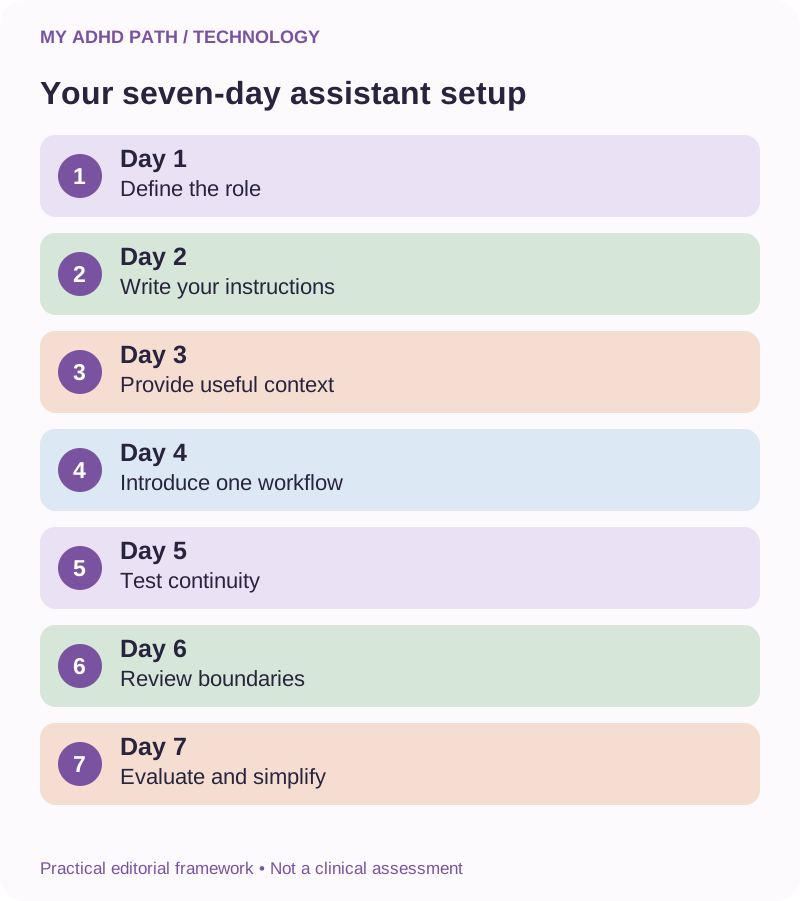
Download PDFYour seven-day personal assistant setup
Day one: Define the role
Choose one area of everyday life where you would like more structured support.
Day two: Write your instructions
Explain your communication preferences, practical needs and boundaries.
Day three: Provide useful context
Create a concise overview of relevant responsibilities or an active project.
Day four: Introduce one workflow
Try a morning planning conversation or project restart.
Day five: Test continuity
Save a short progress summary and use it when returning to the activity.
Day six: Review the boundaries
Check whether your current instructions and information arrangements are appropriate.
Day seven: Evaluate and simplify
Identify what helped and remove anything that introduced unnecessary effort.
Good to know
You can complete these stages at your own pace. There is no requirement to configure an advanced assistant within a particular timeframe.
Twelve prompts for building and maintaining your assistant
AI prompt
Define my assistant's role
"Help me establish a clear role for my personal AI assistant based on the practical activities I find difficult. Ask one question at a time."
AI prompt
Create my personal instructions
"Turn my communication preferences, support needs and boundaries into a concise set of reusable AI instructions."
AI prompt
Identify useful context
"Help me establish what information would genuinely improve your support, and what information is unnecessary or too sensitive to share."
AI prompt
Create a project overview
"Organise this information into a concise project overview containing objectives, agreed decisions, completed work, outstanding actions and dependencies."
AI prompt
Review my project information
"Compare these updated project notes with the previous overview. Identify changes, contradictions and information that needs verification."
AI prompt
Create a morning workflow
"Help me establish a repeatable morning planning conversation that considers deadlines, available time, capacity and realistic priorities."
AI prompt
Switch response modes
"I'm in action mode. Help me complete the current activity without introducing unrelated suggestions."
AI prompt
Simplify my responsibilities
"I'm managing too many competing responsibilities. Help me identify essential commitments, activities that can wait and one manageable starting action."
AI prompt
Maintain project continuity
"Create a factual handover summary that I can save externally and use when returning to this project."
AI prompt
Review possible integrations
"Help me identify which connected applications would address an actual practical need. Explain the permissions, limitations and risks involved."
AI prompt
Review my assistant's performance
"Help me evaluate whether this assistant arrangement is reducing practical effort or creating additional administration. Suggest only changes that address an identified problem."
AI prompt
Create a portable backup
"Organise the preferences, instructions, workflows and project information I've provided into a clear document that I can retain independently of this AI service."
Frequently asked questions
Can I create my own AI personal assistant without coding?
Yes. You can begin with an ordinary conversational AI service and provide reusable instructions, project summaries and appropriate context.
Do I need to build a custom GPT or specialised AI?
No. Custom assistants may be useful for repeated activities, but many personal support needs can be addressed through ordinary conversations and available personalisation features.
Which AI service is best for creating a personal assistant?
There is no universal best service. Consider accessibility, reliability, privacy arrangements, available features, cost and whether it meets your practical needs.
Can my AI assistant remember everything about me?
No. Memory features vary between platforms and can omit, misunderstand or retain outdated information.
Should I tell my AI assistant that I have ADHD?
Only if you choose to. Describing your practical support needs and communication preferences may be sufficient.
Can I use an AI assistant for both work and home?
Yes, where appropriate. Maintain boundaries between personal and professional information and comply with workplace confidentiality requirements.
Should I create separate assistants for different responsibilities?
Separate spaces or assistants may be useful when activities have different requirements. Avoid unnecessary complexity.
Can I connect an AI assistant to my calendar?
Some services support calendar integrations. Check availability, permissions and whether the assistant can read or modify information.
Can my assistant manage my email?
Some assistants can retrieve, summarise, draft or send emails through authorised connections. Review access carefully and retain oversight of consequential communication.
Can AI work in the background?
Some services support scheduled tasks or automated workflows. An ordinary conversation does not necessarily continue working independently.
Can I run my own AI assistant on my computer?
Depending on your hardware and technical requirements, local AI systems may be possible. They involve additional setup, security and maintenance responsibilities.
Is a locally hosted AI assistant automatically private?
No. Privacy depends on the entire system, including storage, connected services, access controls and how information is processed.
Can my AI assistant make decisions for me?
It can help explore options and organise information. Important decisions should remain under your control, with appropriate professional support where necessary.
What happens if my assistant forgets a project?
Use an external project overview or restart summary to restore relevant context. Do not rely solely on AI memory.
Do I need a paid subscription to personalise AI?
That depends on the service and features you require. You can often begin with ordinary conversations and reusable instructions.
Can a personal AI assistant replace ADHD coaching?
No. It may provide practical support, but it does not replace the expertise, relationship or professional accountability of appropriately qualified human support.
How much time should I spend setting up my assistant?
Start with a small, useful arrangement. Introduce further complexity only if it addresses an identified need.
How do I know whether my AI assistant is working well?
Consider whether it helps you start activities, organise information, maintain continuity and manage responsibilities with less unnecessary effort.
Build the assistant you actually need
You don't need an assistant that can do absolutely everything.
You need one that can help with the things that make a meaningful difference to your life.
Perhaps that's remembering where you left off.
Perhaps it's working through a complicated decision.
Perhaps it's maintaining an overview of several projects.
Perhaps it's having somewhere to put the extraordinary number of thoughts competing for your attention on a particularly busy morning.
Start there.
Create instructions that reflect how you prefer to work.
Provide useful context.
Keep important information somewhere reliable.
Introduce additional capabilities when they address a genuine need.
And remember that your personal AI assistant doesn't need to become another project you're constantly improving.
Sometimes, the most useful technology is the technology that quietly does what you need it to do.
Leaving you with more time, energy and space for everything else.
Sources and further reading
- Diamond, A. (2013). Executive functions. Annual Review of Psychology. https://doi.org/10.1146/annurev-psych-113011-143750
- Risko, E. F. and Gilbert, S. J. (2016). Cognitive offloading. Trends in Cognitive Sciences. https://doi.org/10.1016/j.tics.2016.07.002
- Willcutt, E. G. et al. (2005). Validity of the executive function theory of attention-deficit/hyperactivity disorder: A meta-analytic review. Biological Psychiatry. https://doi.org/10.1016/j.biopsych.2005.02.006
- Faraone, S. V. et al. (2021). The World Federation of ADHD International Consensus Statement: 208 evidence-based conclusions about the disorder. https://doi.org/10.1016/j.neubiorev.2021.01.022
- NICE - Attention deficit hyperactivity disorder: diagnosis and management (NG87). https://www.nice.org.uk/guidance/ng87
- Information Commissioner's Office - Artificial intelligence and data protection. https://ico.org.uk/
- National Cyber Security Centre. https://www.ncsc.gov.uk/
- National Institute of Standards and Technology - AI Risk Management Framework. https://www.nist.gov/itl/ai-risk-management-framework
- OWASP - GenAI Security Project. https://genai.owasp.org/
This article provides educational information and practical technology guidance. It is not medical advice. General-purpose AI assistants are not established clinical ADHD treatments. The frameworks, scenarios and suggested workflows are illustrative. Features, privacy settings and capabilities vary between providers.