

What if remembering to do something was no longer a necessary part of getting it done?
You need to remember to renew your insurance.
Remember to pay an invoice.
Remember to put the bins out.
Remember to order something before it runs out.
Remember to follow up on an email.
Remember to check whether somebody has responded to the email you remembered to follow up on.
And, of course, remember to check the application you downloaded to help you remember everything.
There's a certain irony in that last one.
For some people with ADHD, the effort involved in remembering responsibilities can be considerably greater than the effort involved in completing them.
Sending an email might take two minutes.
Remembering to send it at the appropriate time is another matter entirely.
Everyday automation offers a different approach.
Instead of creating more things to remember, you can explore ways to remove some of those remembering responsibilities altogether.
And you don't need to be particularly technical to get started.
At a glance
- Automation allows certain activities to happen in response to a defined time, event or condition.
- Everyday tools such as calendars, recurring reminders and automatic payments already offer forms of automation.
- Automation may reduce some of the demands associated with prospective memory and executive functioning.
- AI and automation are related but different technologies.
- The most useful automations often deal with simple, frequently repeated responsibilities.
- Important financial, medical, legal and safety-related activities require appropriate safeguards.
- Automated systems can fail and require proportionate monitoring.
- The objective is to reduce mental workload, not create another complicated system to maintain.
Why remembering can be harder than doing
Imagine you need to telephone somebody on Thursday afternoon.
You know who you need to call.
You know why you're calling.
You know approximately how long the conversation will take.
There is nothing particularly complicated about the activity itself.
The challenge is remembering your intention at an appropriate moment on Thursday.
This involves something known as prospective memory.
Prospective memory allows us to remember intended future actions.
It helps us remember to attend appointments, complete arrangements, return items and carry out responsibilities at appropriate times.
Working memory, by comparison, involves temporarily maintaining and using information during an activity.
Both processes can be relevant to everyday functioning.
Some people with ADHD experience difficulties with aspects of remembering intentions, managing competing demands and following through on planned actions.
Experiences vary considerably, and occasional forgetting is not exclusive to ADHD.
However, when remembering numerous responsibilities requires substantial effort, external support may be particularly useful.
The invisible work behind a recurring task
Consider something as straightforward as putting the household bins out.
The physical activity may take a few minutes.
But it also involves knowing which day the collection takes place.
Remembering whether recycling or general waste is being collected.
Recognising that the relevant day is approaching.
Finding an appropriate time to complete the activity.
Remembering again if you become distracted.
Checking whether somebody else has already done it.
The practical responsibility is relatively small.
The cognitive work surrounding it may involve several separate activities.
Automation may help reduce some of that surrounding work.
A recurring reminder could prompt you at an appropriate time.
A shared notification could make the responsibility visible to other household members.
A calendar could record changes to the collection schedule.
You still need somebody to put the bins out.
Technology can help make remembering less dependent on an individual's memory.
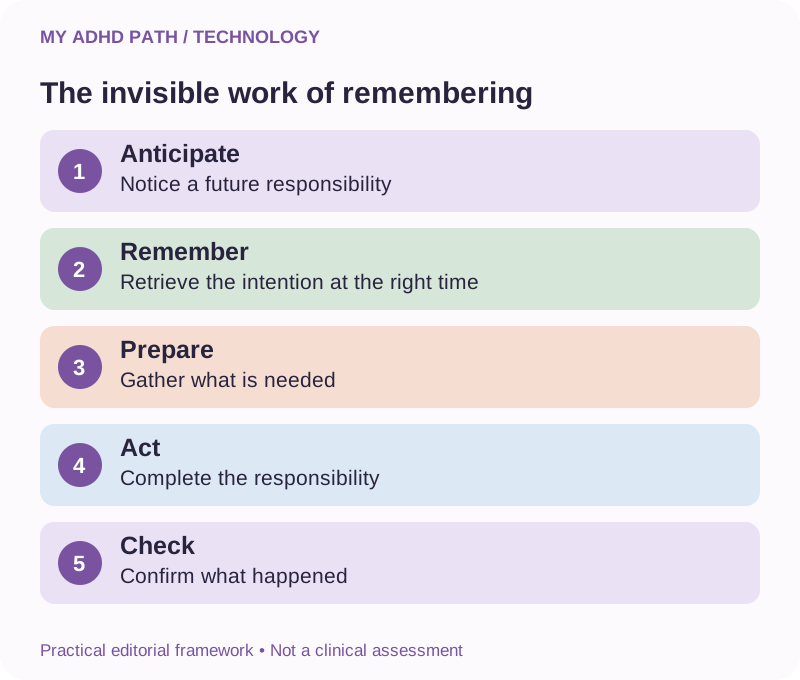
Remembering to do something can require more effort than doing it.
Remembering things is not the same as caring about them
Forgetting an appointment, birthday or household responsibility can sometimes be interpreted as a lack of interest.
But remembering an intention and caring about its outcome are different processes.
A person can genuinely care about attending an important event and still struggle to remember the arrangements at the relevant time.
They may want to respond to a friend's message but repeatedly forget after becoming distracted.
They may care about paying a bill on time while finding it difficult to manage numerous payment dates.
Practical support can help bridge the gap between intention and action.
Automation is one possible form of that support.
It does not replace personal responsibility.
It changes some of the mechanisms through which responsibilities are managed.
What is everyday automation?
Automation involves configuring a system to perform a particular activity when defined circumstances occur.
Those circumstances might involve a time, an event or another condition.
For example:
Every Monday evening, your phone displays a reminder to put the bins out.
When a new appointment is added to your calendar, a reminder is scheduled.
When your robot vacuum reaches its scheduled cleaning time, it begins cleaning.
When a customer completes an online enquiry form, an approved acknowledgement is sent.
Each example involves a predefined relationship between something happening and a resulting activity.
You may already use several forms of automation without thinking of them as automation.
Direct Debits, standing orders, recurring alarms and scheduled heating controls are familiar examples.
You don't need artificial intelligence, programming skills or specialist equipment for many useful everyday automations.
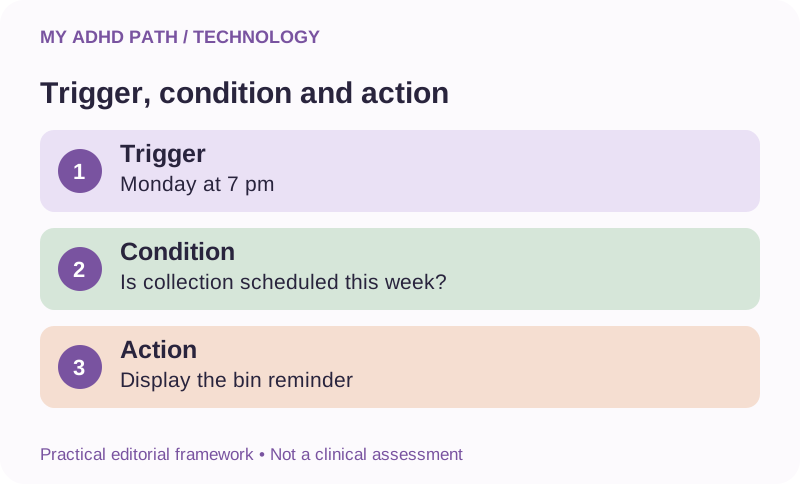
Understanding triggers, conditions and actions
Most digital automations can be understood through three basic components.
The trigger
Something happens that starts the process.
For example, it becomes 7 pm on a Monday.
The condition
The system checks whether any relevant requirements have been met.
For example, the reminder should only appear during weeks when the collection takes place.
Some simple automations do not require an additional condition.
The action
The system performs the configured activity.
For example, your phone displays a reminder to put the bins out.
A more complex automation might include several conditions and actions.
But the fundamental principle remains the same.
When something happens, perform a defined activity if the relevant requirements are satisfied.
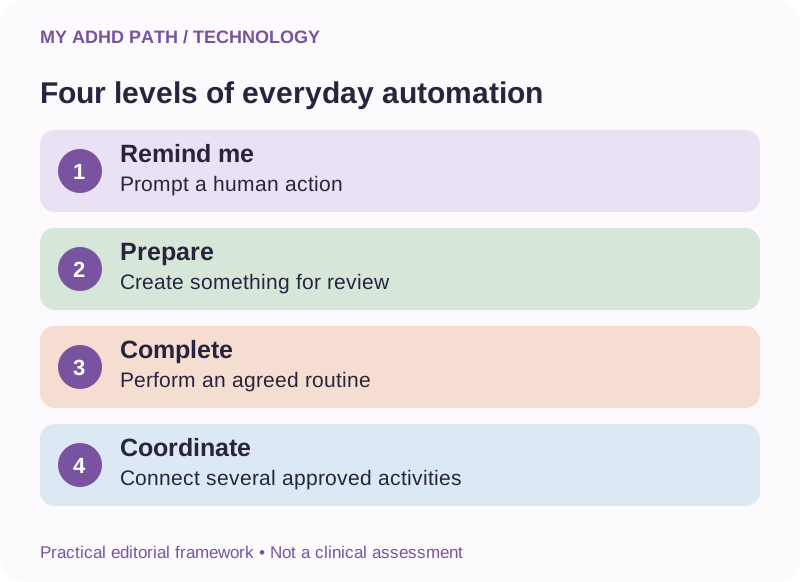
Four levels of everyday automation
The following My ADHD Path framework helps distinguish different degrees of automated assistance.
Level one: Remind me
A system prompts you to complete an activity.
Examples include recurring reminders, appointment notifications and scheduled prompts.
You remain responsible for performing the activity.
Level two: Prepare something for me
A system prepares useful information, a draft or a collection of actions.
For example, an AI assistant prepares a weekly overview from information it has been authorised to access.
You review the output before acting.
Level three: Complete a routine activity
A system performs an agreed activity within defined boundaries.
Examples may include scheduled heating, automatic backups or authorised recurring payments.
You establish the rules and maintain appropriate oversight.
Level four: Coordinate multiple activities
Several systems work together to manage a more complicated process.
For example, a business enquiry form creates an internal task, sends an approved acknowledgement and records the enquiry in an appropriate customer management system.
Greater complexity may introduce additional risks and maintenance requirements.
There is no need to progress through every level.
A simple reminder may provide exactly the support you need.
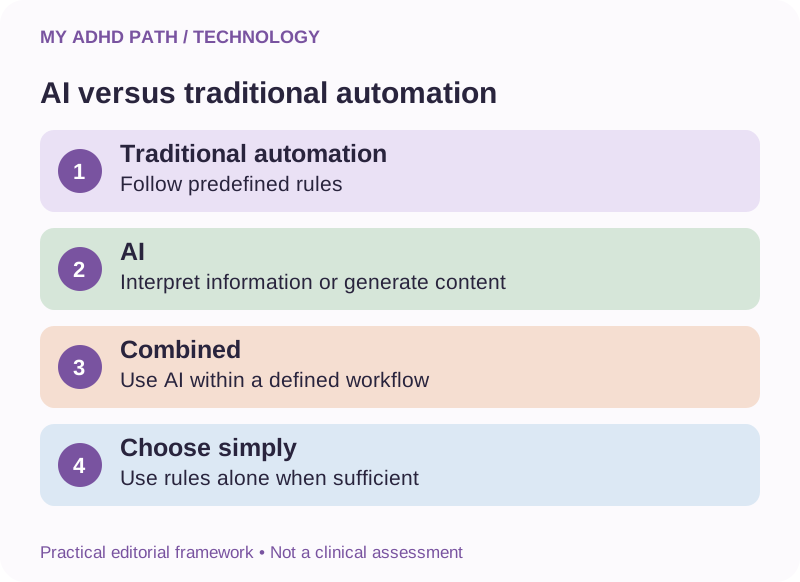
AI and automation: What's the difference?
Artificial intelligence and automation are frequently discussed together.
However, they are not the same thing.
Traditional automation generally follows predefined rules.
If a particular event occurs, perform an established action.
An AI assistant may interpret information, generate content, identify patterns or help reason through a situation.
For example, a traditional automation might remind you to review your diary every Sunday evening.
An AI assistant might help identify possible scheduling conflicts once you've provided the relevant information.
A combined system might prepare an automatically generated weekly overview using approved calendar information.
The greater flexibility of AI can be useful when information is unstructured or circumstances vary.
However, it also means that the output may be less predictable.
Where a simple, deterministic rule is sufficient, adding AI may create unnecessary expense or complexity.
You don't need artificial intelligence to remember bin day.
Twenty everyday automations that may help people with ADHD
1. Recurring household reminders
Create reminders for responsibilities that regularly repeat.
These might include bin collections, replacing household supplies or completing routine maintenance.
Check that schedules reflect changes, such as bank holiday collection arrangements.
2. Appointment preparation reminders
Instead of receiving only a notification shortly before an appointment, create an additional reminder allowing enough time to prepare.
For example, a reminder the previous evening could prompt you to locate relevant documents.
3. Leaving-time notifications
Some calendar and navigation services can estimate when you need to leave for an appointment.
Allow additional time for preparation, parking, accessibility requirements and unexpected delays.
Travel estimates are not guarantees.
4. Birthday and anniversary reminders
Create recurring annual reminders with sufficient notice to make arrangements.
A reminder one week before a birthday may be more useful than a notification on the morning itself.
5. Subscription renewal reminders
Record renewal dates for subscriptions, insurance policies or memberships.
Schedule a reminder before the relevant cancellation or renewal deadline.
Check individual contractual terms.
6. Automatic bill payments
Direct Debits and standing orders may reduce the number of manual payment responsibilities.
However, you must retain appropriate oversight of your balance, payment amounts and upcoming commitments.
Automatic payment does not mean a bill no longer needs reviewing.
7. Low-balance notifications
Some banks provide notifications when account balances reach a specified level.
These may help make changing financial circumstances more visible.
Check which alerts your bank provides and avoid relying exclusively on them.
8. Household supply reminders
Create reminders to review supplies that are regularly used.
Where consumption varies, a reminder to check your stock may be more useful than automatically purchasing another item.
9. Shared shopping lists
A suitable shared list can allow household members to add items as they notice supplies running low.
Voice entry or authorised shortcuts may make capturing items easier.
This reduces dependence on one person remembering everything.
10. Scheduled household cleaning
Compatible appliances, including some robot vacuums, can operate according to schedules.
Use them in accordance with manufacturer safety instructions and appropriate household conditions.
They may reduce some recurring practical responsibilities, although maintenance remains necessary.
11. Scheduled lighting and heating
Compatible devices can be configured around household routines.
This may reduce the need to repeatedly adjust ordinary settings.
Consider security, energy costs, safety and appropriate installation.
12. Focus settings on your devices
Many devices allow notifications to be limited during particular times or activities.
A scheduled focus setting may help reduce unnecessary interruptions while preserving access to important communications.
Check that emergency contacts and essential notifications remain available.
13. Email sorting rules
Some email services allow incoming messages to be categorised automatically.
Routine newsletters, receipts and other predictable communications may be easier to find when appropriately organised.
Avoid rules that could conceal important messages or permanently delete information without review.
14. Follow-up reminders
Schedule reminders to review messages that require a response.
Some email systems offer snoozing or follow-up functions.
A reminder to check an enquiry is different from automatically sending repeated messages.
15. Recurring work tasks
Create repeating tasks for routine business or workplace responsibilities.
Examples include weekly reviews, monthly reporting and scheduled administrative activities.
Ensure that deadlines and processes remain current.
16. Scheduled draft preparation
Where appropriate tools and permissions are available, a system may prepare a recurring report or draft summary.
Review important figures, assumptions and factual claims before using the output.
17. Approved enquiry acknowledgements
A business may send a standard acknowledgement when a customer submits an enquiry.
Keep the wording accurate and avoid promising response times or services that cannot reliably be delivered.
18. Automatic file backups
Suitable backup software can create copies of important information without requiring manual intervention each time.
Check that backups are operating successfully and test whether information can be restored.
Synchronisation alone is not necessarily a complete backup solution.
19. Weekly planning reminders
Create a recurring prompt to review the coming week's commitments and outstanding activities.
An AI assistant may help organise the information during that review.
Keep confirmed arrangements in reliable records.
20. End-of-day handover prompts
Schedule a reminder to record unfinished work and the next useful action before ending a working session.
For people managing several projects, this may help preserve continuity across interruptions.
The prompt is automated.
The important thinking and verification remain human activities.
Automating the remembering, not necessarily the doing
It can be tempting to assume that a useful automation must complete an entire task.
But some responsibilities should remain under direct human control.
Consider renewing an insurance policy.
Automatically purchasing another policy might not be appropriate because your circumstances, requirements or available alternatives may have changed.
However, an automatic reminder several weeks before the renewal date may be extremely useful.
It removes the responsibility of continually remembering that a decision is approaching.
You retain responsibility for making that decision.
The same distinction applies to many activities involving money, health, contracts and important family arrangements.
Automate the preparation or remembering where appropriate. Keep consequential judgement where it belongs.
Choosing the right moment for a reminder
A reminder is only useful if it arrives at a time when you can meaningfully respond to it.
Imagine receiving a reminder to telephone your dentist at 9 pm.
You remember that you need to call.
Unfortunately, the practice is closed.
You dismiss the notification.
The responsibility returns to your memory.
A more useful reminder might appear during opening hours when you have an opportunity to respond.
The most effective timing will depend on your circumstances and the activity involved.
Consider three questions.
When can I actually complete this responsibility?
What information or preparation will I need?
What happens if I'm unable to act when the reminder appears?
A suitable reminder system may allow you to postpone the notification deliberately or transfer the activity into a trusted task system.
The objective is not simply to generate an alert.
It is to support the intended action.
Try this
Next time you set a reminder, ask yourself: will I actually be able to act on this when it appears? If not, choose a time when you can.
Why too many notifications can become unhelpful
When everything generates a notification, distinguishing important information can become difficult.
You might receive reminders from several applications.
Alongside emails, messages, news alerts, calendar notifications and social media updates.
Over time, notifications may become another category of information you regularly dismiss.
This is sometimes described informally as notification fatigue.
Rather than adding another reminder whenever you forget something, review the existing notifications.
Which ones require an action?
Which ones provide useful information?
Which ones are repeatedly ignored?
Which ones duplicate another reminder?
Which ones are unnecessary?
A smaller collection of meaningful notifications may be more manageable than a large collection of competing alerts.
Our digital organisation guide explores this in greater depth.
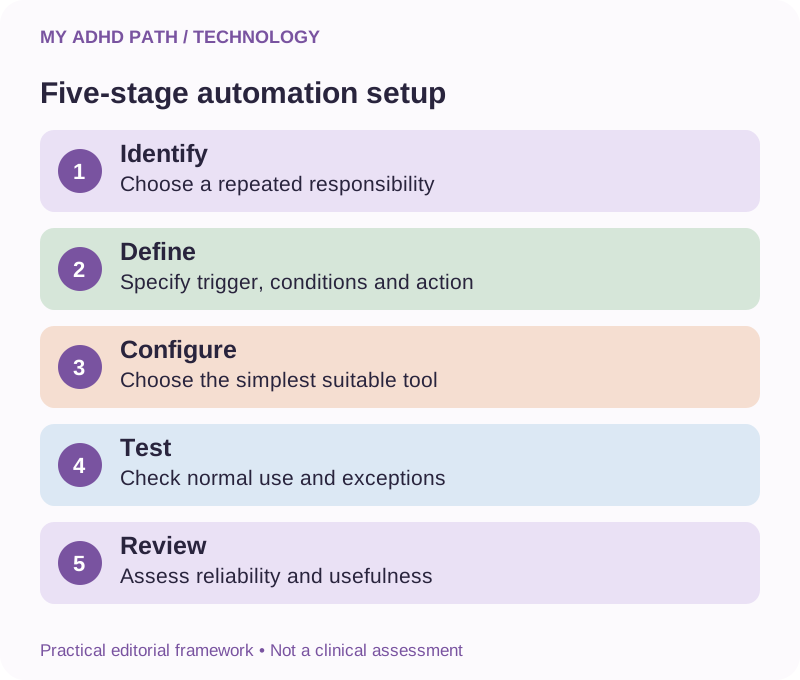
The five-stage automation setup method
Before introducing a new automation, consider these five stages.
Stage one: Identify
Find a recurring responsibility that creates unnecessary mental effort.
Stage two: Define
Establish what needs to happen, when it needs to happen and under what conditions.
Stage three: Configure
Choose the simplest suitable tool and establish the relevant automation.
Stage four: Test
Check that the process works as intended, including foreseeable exceptions.
Stage five: Review
Consider whether it remains useful, reliable and proportionate.
Good to know
This My ADHD Path framework is an editorial planning approach rather than a clinically validated intervention. Its purpose is to help you introduce support without unnecessarily complicating your digital environment.
Worked example: Remembering to renew car insurance
Imagine that your car insurance renews on 15 September.
You want enough time to review your cover and compare suitable alternatives.
Rather than depending on your memory, you could establish a recurring annual calendar entry.
Then create an advance reminder.
For example:
Renewal date: 15 September.
First reminder: 15 August - review current cover and renewal arrangements.
Second reminder: 1 September - check progress and outstanding decisions.
These dates are illustrative.
Your actual policy and cancellation terms may require a different schedule.
You might also need a prompt to confirm that replacement cover is active before an existing policy ends.
The automation supports the process.
It does not change, cancel or purchase the insurance.
Once configured and checked, the remembering responsibility is substantially more externalised.
Worked example: Keeping track of unanswered emails
Suppose you've sent an important request to an organisation.
You need to check whether a response has arrived.
Rather than repeatedly thinking about it or searching your inbox, create a follow-up reminder.
Record:
The date the request was sent.
What response you are expecting.
Any relevant published or agreed response deadline.
The date you intend to review progress.
A link or reference to the original correspondence.
If a response arrives, update or cancel the reminder.
If no response arrives, decide on the appropriate next step.
An AI assistant may help prepare a factual follow-up message.
For formal applications, complaints or legal matters, distinguish your personal reminder dates from official statutory deadlines or published service standards.
Do not automatically send repeated messages without considering their appropriateness.
Worked example: A weekly household planning routine
Imagine that your household regularly needs to coordinate school activities, work arrangements, shopping and meals.
You decide to establish a recurring reminder every Sunday afternoon.
During that review, you check the shared calendar.
Identify outstanding arrangements.
Choose meals for busy evenings.
Discuss responsibilities with other household members.
Record anything that still needs arranging.
An AI assistant can help organise the information if appropriate.
The automation itself might simply be one recurring calendar entry.
You don't need an elaborate network of connected applications to create a useful support system.
Worked example: From business enquiry to organised follow-up
An independent business receives customer enquiries through an online form.
The owner regularly remembers seeing an enquiry but struggles to establish whether all the necessary actions have been completed.
A suitable automated process might work as follows.
First, a customer submits the form.
Second, the system records the enquiry in an appropriate business system.
Third, an approved acknowledgement is sent.
Fourth, an internal follow-up task is created.
Finally, the owner reviews and responds to the enquiry.
Each stage requires appropriate privacy arrangements, secure configuration and testing.
The automation should not invent prices, make contractual commitments or promise that a customer is eligible for a particular service.
If a stage fails, the business needs a way to recognise and address the problem.
The system should reduce administrative effort while preserving responsible customer service.
Where to start if you're not technical
You may already have access to useful automation features on your existing devices.
On your phone
Recurring reminders, alarms, calendar notifications, focus settings and accessibility features.
In your email
Sorting rules, scheduled messages, snoozing and follow-up prompts.
In your calendar
Repeating events, advance reminders and shared schedules.
In your banking application
Available transaction notifications, payment arrangements and account alerts.
In your household devices
Manufacturer-supported schedules and appropriate automated settings.
The exact features available depend on your device, software and service provider.
You don't need to purchase another subscription before exploring what you already have.
Start with a responsibility that regularly causes difficulty and investigate whether your existing technology can support it.
Understanding shortcuts and connected workflows
Some devices and services provide tools that allow several activities to be connected together.
Examples include Apple Shortcuts, Microsoft Power Automate, Zapier, Make and n8n.
These products offer different capabilities and levels of complexity.
Some workflows can be configured using visual interfaces.
Others require more technical knowledge, administrative permissions or additional services.
A typical connected workflow might:
Receive information from an approved source.
Check whether defined conditions have been met.
Transfer information to another authorised system.
Create a task or notification.
Record the result.
Before connecting applications, consider the information being transferred and the permissions involved.
Do not grant unrestricted access to your accounts simply because it makes configuring a workflow easier.
Product features, pricing and permissions can change.
Consult current documentation when selecting or configuring a service.
Using AI to help design an automation
You don't need to understand every technical detail before identifying something that might be useful.
An AI assistant may help you explain the current process and work out which parts could be automated.
Start by describing the activity.
For example:
"Every month I need to review several business subscriptions. I keep forgetting which ones renew when. Help me design a simple reminder system before suggesting anything more complicated."
The assistant could help identify the information you need to record, appropriate reminder timings and suitable existing tools.
It may also explain how a particular supported feature works.
However, AI-generated technical instructions may be incorrect or refer to features that are no longer available.
Use official documentation and test any resulting configuration.
Never paste passwords, private access tokens or secret credentials into an ordinary AI conversation.
What should you automate first?
A useful starting point is a responsibility that meets four conditions.
It happens regularly.
Remembering it requires effort.
The process is reasonably predictable.
The consequences of an automation error are manageable.
For example, sending yourself a weekly reminder to check household supplies may be a relatively low-risk starting point.
Automatically committing to purchases, making investments or sending consequential legal communications introduces considerably greater risks.
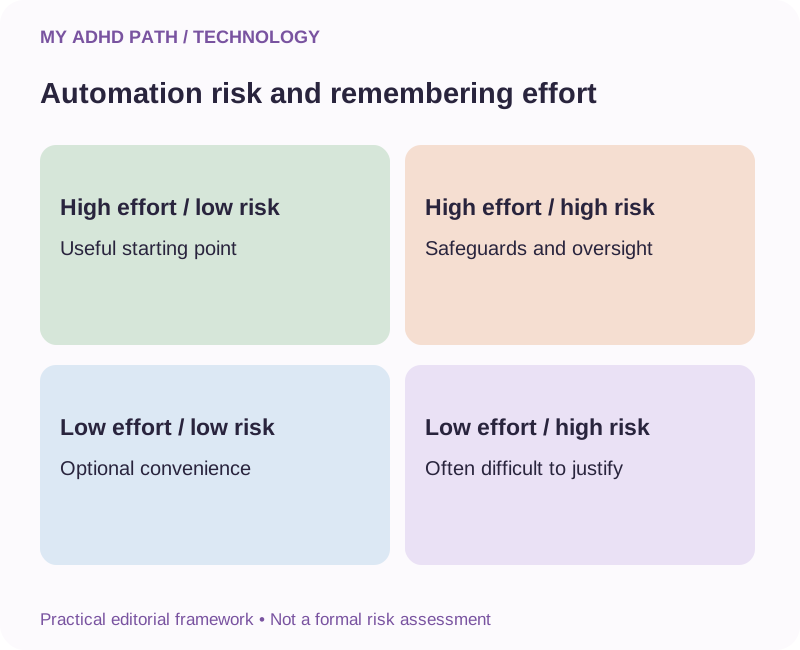
You can think about potential automations in terms of effort and consequences.
High remembering effort, low automation risk
Often a useful starting point.
Low remembering effort, low automation risk
Optional convenience.
High remembering effort, high automation risk
Potentially useful, but requires careful safeguards and human oversight.
Low remembering effort, high automation risk
Often difficult to justify unless there is another clear benefit.
Good to know
This is a practical evaluation framework rather than a formal risk assessment.
When an automation creates more work than it saves
Imagine spending an entire afternoon configuring a workflow that saves thirty seconds once a month.
You may have enjoyed learning how to build it.
That has its own value.
But if your objective was reducing everyday administration, the result may not justify the time invested.
Automation can also introduce ongoing responsibilities.
Checking connections.
Maintaining subscriptions.
Correcting errors.
Updating settings.
Monitoring failures.
Replacing obsolete services.
A useful automation should be evaluated across its whole life, not simply its initial setup.
Sometimes the best solution is a recurring calendar entry.
Sometimes it is a more sophisticated workflow.
And sometimes it is deciding that the activity does not need automating at all.
Calculating whether an automation saves time
Imagine a recurring activity that takes five minutes every working day.
If you complete it on five days each week for 48 weeks, that represents:
5 minutes x 5 days x 48 weeks = 1,200 minutes.
That's 20 hours over a year.
Suppose a suitable automation reduces the daily activity to a one-minute check.
That represents four hours over the same period.
The theoretical difference is 16 hours.
However, if configuring the automation takes three hours and maintaining it takes two hours, the illustrative net time saving becomes 11 hours during the first year.
These figures are hypothetical.
Real savings depend on interruptions, maintenance, reliability and other circumstances.
Time is also not the only measure of usefulness.
For somebody who finds remembering a responsibility particularly demanding, removing that repeated cognitive effort may be valuable even where the measurable time saving is relatively small.
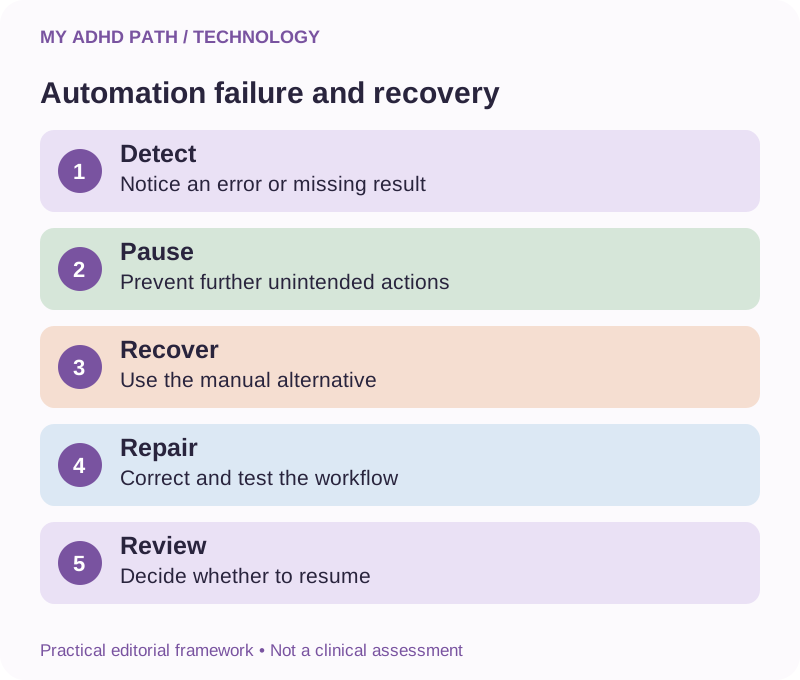
What happens when an automation fails?
Automations are sometimes described as systems you can set up and forget.
In reality, digital systems can fail for many reasons.
An account connection expires.
A password changes.
An application updates its software.
An internet connection becomes unavailable.
A device loses power.
An external service changes its features.
A workflow encounters information it was not designed to handle.
For low-consequence activities, occasional failure may cause little inconvenience.
For important responsibilities, failure can have greater consequences.
A suitable system may need:
A clear record of completed activities.
A notification if an important action fails.
A periodic review.
A manual alternative.
A way to pause or disable the automation.
Avoid replacing one demanding responsibility with a constant need to check whether your replacement system is working.
The level of monitoring should reflect the consequences of failure.
Designing automation around exceptions
Not everything happens according to a regular pattern.
School holidays affect household routines.
Bank holidays change opening hours and collection schedules.
Businesses experience unexpected demand.
Appointments are rearranged.
A useful automation needs to accommodate relevant exceptions.
For instance, a recurring weekly school reminder may be inappropriate during holidays.
A scheduled work notification may be unnecessary when you're on annual leave.
An automatic email may be unsuitable if it responds to an unusual customer situation.
Consider whether the automation can be paused, rescheduled or overridden.
When configuring a workflow, ask what should happen if the expected circumstances are not present.
A simple, understandable system may be easier to maintain than a complicated system attempting to anticipate every possibility.
Financial automation and ADHD
Financial administration can involve numerous recurring responsibilities.
Automatic payments and reminders may help make some aspects more manageable.
However, they can introduce difficulties if payment amounts change, funds are unavailable or unwanted subscriptions continue indefinitely.
Review:
Which payments are automated.
How much is expected.
When payments are due.
Whether amounts are fixed or variable.
Whether the service remains necessary.
How to cancel an unwanted arrangement correctly.
In the UK, Direct Debits and standing orders operate differently.
A standing order generally instructs your bank to send a specified payment.
A Direct Debit authorises an organisation to collect payments under an agreed arrangement, which may involve changing amounts.
Check the relevant terms and protections with your bank or provider.
Cancelling a payment arrangement does not necessarily cancel an underlying contract.
For independent financial guidance, MoneyHelper is a useful starting point.
https://www.moneyhelper.org.uk/
Automation can help support financial organisation, but it cannot replace appropriate budgeting, monitoring or professional advice.
Medication reminders and health-related automation
Some people use reminders to support medication routines, appointments or other health-related responsibilities.
These can be useful practical aids.
However, medication reminders do not determine whether a medicine is appropriate, whether a dose has already been taken or what to do if a dose is missed.
Avoid relying exclusively on a generic automation for a safety-critical medical responsibility.
Follow your prescriber's or pharmacist's instructions.
If a reminder is missed or you are uncertain whether you have taken medication, seek appropriate advice rather than automatically taking another dose.
Where necessary, discuss suitable medication management support with a healthcare professional.
Automation should support an agreed care arrangement.
It should never independently change medication instructions.
Smart homes and the ADHD household
Smart home technology can provide support with familiar routines.
Lights can operate on schedules.
Compatible household devices can be managed through shared controls.
Some sensors can provide useful notifications.
Voice assistants may help capture shopping items or set reminders without needing to navigate several applications.
However, smart devices also introduce considerations involving connectivity, privacy and security.
Choose reputable products.
Keep software updated.
Use appropriate account security.
Review device permissions.
Maintain safe manual alternatives where necessary.
Do not configure appliances to operate in ways that conflict with manufacturer safety guidance.
A connected home should remain manageable when an internet connection or service becomes unavailable.
Automation and shared household responsibilities
An automated reminder can make a responsibility visible to more than one person.
But it does not automatically establish who is responsible for completing it.
Imagine a shared notification reminding everybody that the bins need putting out.
Each person assumes somebody else will do it.
The notification was delivered successfully.
The responsibility remains unresolved.
Agree appropriate ownership alongside the automation.
Who normally completes this activity?
Who covers it when that person is unavailable?
How will the household know if something changes?
Shared tools should support cooperation rather than become another mechanism through which one person manages everybody else.
Everyday automation at work
Workplace technology may provide useful ways to organise recurring responsibilities.
Potential applications include reminders, calendar management, task templates, approved meeting summaries and routine reporting.
Employees should check which services are authorised by their organisation.
Do not connect a personal AI account to confidential workplace systems without permission.
Some employers restrict external automation platforms or require specific security arrangements.
These restrictions may have important purposes, including protecting customer information and business records.
If you experience disability-related difficulties managing workplace responsibilities, discuss appropriate adjustments with your employer.
Access to Work may also provide support for eligible people in Great Britain, depending on their circumstances and assessed needs.
Funding for particular software or automation services is not guaranteed.
Official information:
https://www.gov.uk/access-to-work
Our dedicated Access to Work resource centre explores the scheme in more detail.
Keeping your automated systems secure
Automation services may require access to email, calendars, customer records or other information.
Before authorising a connection, consider what access is required.
Can the service read your information?
Can it edit or delete records?
Can it send messages?
Can it make changes without your approval?
Does it need all the requested permissions?
What happens to the information transferred between services?
Where possible, use limited permissions, appropriate account security and separate credentials for different purposes.
Remove connections you no longer need.
Review the privacy and security arrangements of the services involved.
Never publish or share secret access credentials.
The Information Commissioner's Office and National Cyber Security Centre provide useful UK guidance.
Five responsibilities that generally need human judgement
Automation is not appropriate for every activity.
Take particular care with:
Medical and care decisions
Use appropriate professional guidance and established care arrangements.
Significant financial decisions
Do not allow an unverified workflow to make investments or consequential financial commitments.
Legal and contractual commitments
Review important communications, documents and agreements.
Children's safety
Retain appropriate adult supervision and safeguarding arrangements.
Business-critical changes
Require suitable authorisation, testing, backups and oversight.
There may be professionally designed systems that safely support parts of these activities.
However, casually configured consumer automations should not be treated as substitutes for appropriate expertise or responsibility.
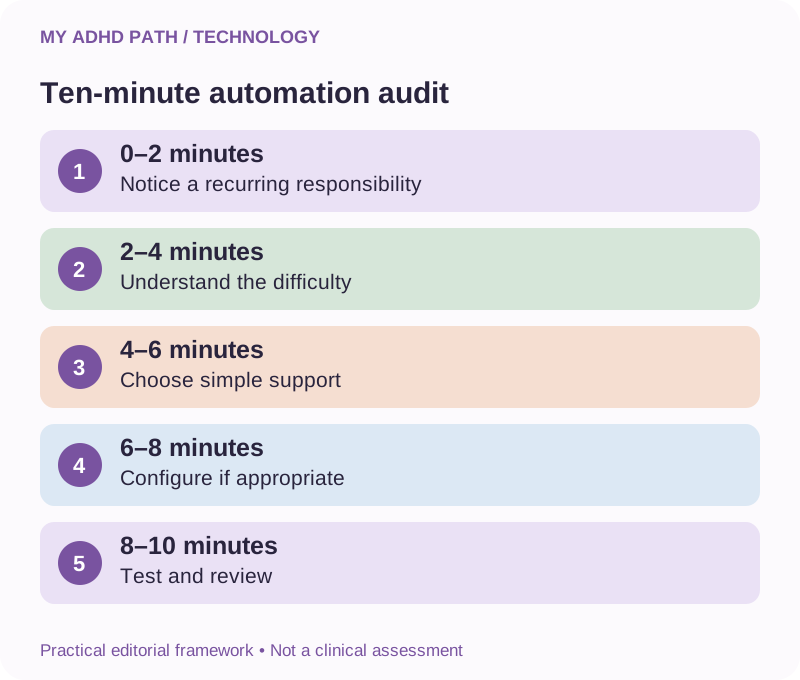
A ten-minute everyday automation audit
You can begin exploring automation without configuring anything complicated.
Minutes one and two: Notice
Identify something you regularly need to remember.
Minutes three and four: Understand
Establish when the activity occurs and what makes remembering it difficult.
Minutes five and six: Choose
Identify the simplest suitable form of support.
Minutes seven and eight: Configure
Set up a low-risk reminder or another appropriate basic automation if possible.
Minutes nine and ten: Test
Check the settings and establish when you will review their usefulness.
The exercise is illustrative.
Some automations require considerably more time and preparation.
There is no need to automate your entire life in one afternoon.
Three fictional everyday experiences
Illustrative scenario
Helen, 44 - Managing recurring household responsibilities
Helen regularly remembers household responsibilities at moments when she cannot complete them. She creates recurring reminders scheduled for times when the relevant activities are more manageable. She also reviews which responsibilities can be shared with other household members. Her objective is to reduce the need to continually remember everything herself.
Illustrative scenario
Josh, 28 - Keeping track of financial administration
Josh finds it difficult to maintain awareness of several payment and subscription dates. He reviews his existing banking notifications and establishes reminders before contract renewal deadlines. He maintains appropriate financial oversight and checks that sufficient funds are available for recurring payments. He uses automation to make his commitments more visible rather than assuming they no longer need attention.
Illustrative scenario
Nadia, 39 - Running a small business
Nadia receives enquiries through several channels and sometimes loses track of outstanding follow-ups. She introduces a straightforward system that records website enquiries, sends approved acknowledgements and creates internal follow-up tasks. She tests the workflow, monitors important failures and keeps a manual alternative available. Her objective is to reduce repeated administration while maintaining responsibility for customer service.
What the research says
Research into executive functioning and prospective memory provides relevant background for understanding the demands associated with remembering future intentions. Cognitive offloading research explores how external resources can change the cognitive requirements of activities. Examples include using reminders, written records or other external supports rather than relying exclusively on internal memory. Research has also examined how people decide when to use reminders and other forms of external support. However, evidence concerning cognitive offloading should not be interpreted as proof that a particular automation platform treats ADHD or improves clinical outcomes. The usefulness of an automated system depends on the person, the activity, its reliability and the wider circumstances. An automation that reduces demands for one person may create additional complexity for another. The strategies in this article are practical approaches inspired by relevant cognitive principles. They are not clinically validated ADHD interventions.
Create your personal automation map
Think about a responsibility you regularly need to remember.
Complete the following questions.
The responsibility: What needs to happen?
Frequency: How often does it occur?
Current difficulty: What makes it demanding to manage?
Trigger: What time, event or condition should start the process?
Action: What should the system do?
Human involvement: What still requires my judgement or participation?
Exceptions: When should the automation operate differently?
Failure: How would I recognise that it hasn't worked?
Alternative: What would I do if the system became unavailable?
Review: When will I check whether it remains useful?
You do not necessarily need a detailed answer to every question for a simple reminder.
More consequential workflows require greater consideration.
Downloadable resource
My ADHD Everyday Automation Toolkit
Simple systems for remembering less and managing everyday life. Includes your personal automation map, recurring responsibility audit, automation review record and practical exercises.
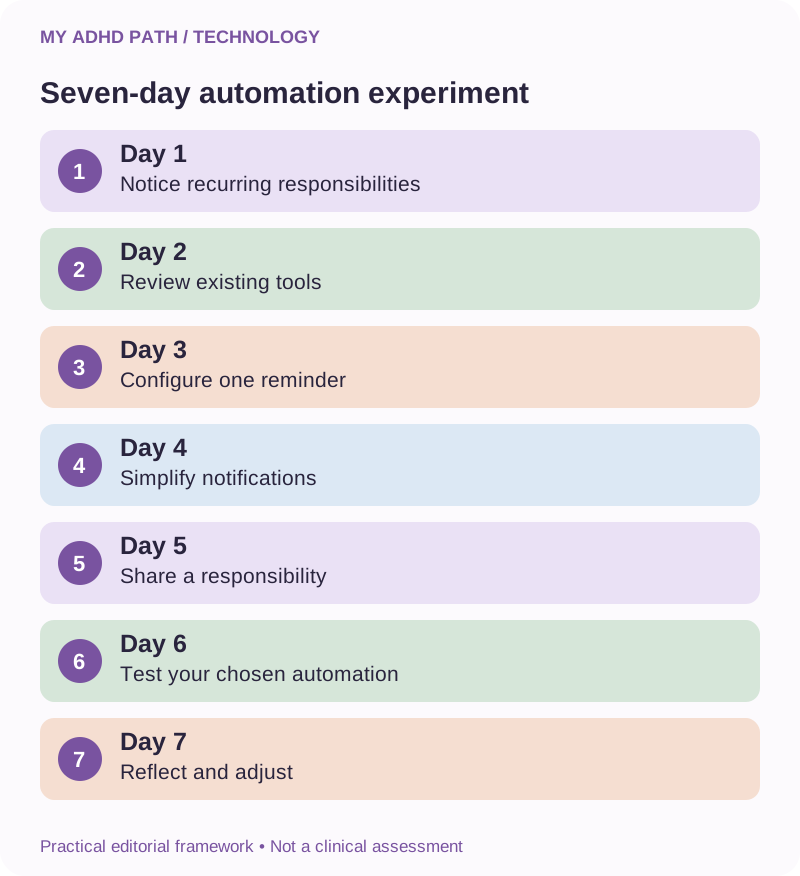
Download PDFYour seven-day everyday automation experiment
Day one: Notice
Identify three responsibilities you frequently need to remember.
Day two: Review
Explore the reminder and scheduling features you already have available.
Day three: Configure
Set up one low-risk recurring reminder.
Day four: Simplify
Review notifications that regularly interrupt you without providing useful information.
Day five: Share
Discuss whether one household responsibility could be better organised or shared.
Day six: Test
Check whether your chosen automation behaves as expected.
Day seven: Reflect
Consider whether it reduced mental effort, introduced new demands or requires adjustment.
Keep the useful elements.
Remove what doesn't help.
This is a practical personal experiment, not a clinical assessment.
Fifteen AI prompts for everyday automation
AI prompt
1. Identify what I could automate
"Help me identify recurring responsibilities that might benefit from simple reminders or automation."
AI prompt
2. Keep it simple
"Suggest the simplest suitable approach using tools I already have before recommending additional software."
AI prompt
3. Separate remembering from doing
"Identify which parts of this responsibility could be automated and which still require my involvement."
AI prompt
4. Establish the trigger
"Help me identify what time, event or condition should start this activity."
AI prompt
5. Improve my reminder timing
"Help me choose reminder timings based on when I can actually act and how much preparation I need."
AI prompt
6. Review my notifications
"Help me distinguish useful actionable notifications from unnecessary or duplicated alerts."
AI prompt
7. Organise renewal dates
"Help me structure a system for recording renewal dates, cancellation deadlines and review reminders."
AI prompt
8. Build a weekly review
"Help me create a manageable recurring review of my household or work commitments."
AI prompt
9. Identify potential risks
"Review this proposed automation and identify foreseeable problems, including inappropriate permissions and unintended actions."
AI prompt
10. Plan for exceptions
"What should happen if the expected circumstances change or a required condition is not met?"
AI prompt
11. Help me test this workflow
"Suggest test cases, including ordinary use, missing information, duplicate inputs and failed connections."
AI prompt
12. Create a manual alternative
"Help me establish how to complete this activity if the automated system becomes unavailable."
AI prompt
13. Evaluate whether it's worthwhile
"Compare the likely setup, maintenance and financial costs with the practical benefits of this automation."
AI prompt
14. Document my automation
"Create a concise record of this workflow, including its purpose, trigger, actions, permissions, checks and review date."
AI prompt
15. Simplify my existing systems
"Review my current automations and help identify unnecessary complexity or activities that no longer provide meaningful value."
Frequently asked questions
What is automation for ADHD?
It involves using technology to perform or prompt predefined activities, potentially reducing some remembering and administrative demands.
Can automation help with ADHD forgetfulness?
External reminders and automated processes may help support future intentions. Their usefulness varies between individuals and circumstances.
Do I need AI to automate everyday activities?
No. Many useful automations rely on ordinary schedules, reminders or predefined rules.
Do I need programming skills?
Not for many common reminders, device schedules and email rules. More complex connected workflows may require technical expertise.
What should I automate first?
Choose a recurring, predictable responsibility with manageable consequences if something goes wrong.
Are reminders a form of automation?
Yes. Automatically displaying a notification at a predefined time or event is a simple form of automation.
Why do I ignore my reminders?
Possible reasons include excessive notifications, unsuitable timing, unclear instructions or being unable to act when they appear.
Can automation help with household organisation?
It may support reminders, shared lists, schedules and routine activities. Appropriate responsibility and family cooperation remain important.
Is automatic bill payment a good idea for ADHD?
It may reduce some manual payment responsibilities, but appropriate financial monitoring, sufficient funds and contract reviews remain necessary.
Can I automate subscription cancellations?
A reminder to review or cancel a subscription may be safer than automatically making a consequential contractual change. Check individual terms.
Can automation help with medication routines?
Reminders can support agreed routines, but they cannot provide individual medical advice or determine what to do about missed or uncertain doses.
Can AI automatically organise my calendar?
Some services can manage calendar entries when appropriate connections and permissions are available. Review accuracy and avoid assuming changes have occurred without confirmation.
What are no-code automation tools?
They are services that allow users to configure certain workflows through visual interfaces rather than writing all the underlying software themselves.
Are smart home devices useful for ADHD?
Some people may find scheduled routines, voice controls and reminders useful. Consider safety, security, cost and maintenance.
Can automation reduce the mental load of running a business?
It may reduce certain repeated administrative activities when workflows are carefully configured and monitored.
What if my automation stops working?
Use appropriate monitoring, periodic checks and manual alternatives based on the consequences of failure.
Can Access to Work fund automation software?
Potential support depends on eligibility, individual employment-related needs and current scheme requirements. Specific software funding is not guaranteed.
Is everyday automation expensive?
Not necessarily. Many devices already include useful reminder and scheduling features. Advanced services may involve equipment or subscription costs.
How do I know whether an automation is useful?
Consider whether it reliably reduces mental effort, time or repeated interruptions without creating disproportionate maintenance or risk.
Is automation a treatment for ADHD?
No. It is a potential practical support method rather than a replacement for appropriate clinical care.
Make remembering less of a full-time job
Imagine not needing to keep checking whether an important renewal is approaching.
Imagine knowing that a recurring responsibility will become visible when you can do something about it.
Imagine finishing a working day without having to remember everything you need to return to tomorrow.
These are relatively ordinary changes.
But ordinary changes can make a meaningful difference to everyday life.
You don't need a completely automated home.
You don't need a collection of expensive applications.
You don't need to build a sophisticated digital assistant before you can benefit from automation.
Start with one thing you regularly need to remember.
Find a reliable way to make that responsibility visible at the right moment.
Then consider whether there is anything else that could be made a little easier.
The objective isn't to automate being human. It's to spend less of your life remembering the things that surround it.
Sources and further reading
- Risko, E. F. and Gilbert, S. J. (2016). Cognitive Offloading. Trends in Cognitive Sciences. https://doi.org/10.1016/j.tics.2016.07.002
- Gilbert, S. J. (2015). Strategic Offloading of Delayed Intentions into the External Environment. Quarterly Journal of Experimental Psychology. https://doi.org/10.1080/17470218.2014.972963
- Diamond, A. (2013). Executive Functions. Annual Review of Psychology. https://doi.org/10.1146/annurev-psych-113011-143750
- Willcutt, E. G. et al. (2005). Validity of the Executive Function Theory of Attention-Deficit/Hyperactivity Disorder: A Meta-Analytic Review. Biological Psychiatry. https://doi.org/10.1016/j.biopsych.2005.02.006
- Baddeley, A. (2012). Working Memory: Theories, Models, and Controversies. Annual Review of Psychology. https://doi.org/10.1146/annurev-psych-120710-100422
- Faraone, S. V. et al. (2021). The World Federation of ADHD International Consensus Statement. https://doi.org/10.1016/j.neubiorev.2021.01.022
- NICE - ADHD: diagnosis and management. https://www.nice.org.uk/guidance/ng87
- National Cyber Security Centre. https://www.ncsc.gov.uk/
- Information Commissioner's Office. https://ico.org.uk/
- MoneyHelper. https://www.moneyhelper.org.uk/
- GOV.UK - Access to Work. https://www.gov.uk/access-to-work
- Apple Shortcuts User Guide. https://support.apple.com/guide/shortcuts/welcome/ios
- Microsoft Power Automate documentation. https://learn.microsoft.com/en-us/power-automate/
- Zapier documentation. https://help.zapier.com/
- Make documentation. https://help.make.com/
- n8n documentation. https://docs.n8n.io/
This article provides general educational information and practical suggestions. It does not constitute medical, financial, legal, technical security or professional advice. Its frameworks and exercises are illustrative rather than clinically validated ADHD interventions. Automated systems require appropriate configuration, testing, security and human oversight.